

RPM vs. CPM: Which Metric Should Drive Your Decisions
If your Google Ad Manager report shows AdX CPM climbing while revenue per visit stays flat, don’t stop at the demand line. For publishers, RPM should drive yield, content, and template calls because it connects revenue to pageviews or sessions. CPM is better for diagnosing demand, floors, deals, and ad-unit pricing.
Key takeaways
- Use RPM to judge site performance because it ties revenue to pageviews, sessions, or other publisher-controlled units.
- Use CPM to diagnose demand issues like floors, deal pricing, bidder pressure, and ad-unit economics.
- Page RPM and session RPM only work when the numerator and denominator match the same reporting scope.
- A high CPM can still be a weak business result if the inventory fills poorly or reaches too few users.
- Benchmark RPM by vertical, template, and device or you’ll end up comparing inventory that behaves differently.
What RPM and CPM measure for publishers
CPM measures what an advertiser pays for 1,000 ad impressions. RPM measures how efficiently the publisher turns a chosen unit into revenue, whether that unit is pageviews, monetizable pageviews, ad impressions, or sessions. The denominator is where most of the real analysis happens.
CPM is a demand-side price signal
CPM, or cost per mille, shows what a buyer pays for 1,000 impressions. In publisher reporting, it helps when you’re pricing a direct campaign, comparing AdX with header bidding demand, reviewing a sponsorship proposal, or checking whether a floor is shutting out bids that used to clear.
Oraki draws the line clearly: CPM reflects advertiser cost, while RPM is the metric publishers use to judge what they earn from inventory. That matters because an ad unit can post a healthy CPM and still add little to page yield if it barely fills, rarely enters view, or lives on a low-traffic template Oraki.
RPM is a publisher yield signal
RPM, revenue per mille, estimates publisher revenue per 1,000 units. NitroPay’s pageview example is straightforward: US$10,000 in estimated earnings across 2,000,000 pageviews equals a US$5.00 RPM. That tells you what the site earned per 1,000 pageviews, not what a single buyer paid NitroPay.
For operating decisions, start with RPM. Your P&L doesn’t care whether the money came from one expensive impression or six average-priced impressions across the page. It cares how many dollars your traffic, templates, devices, and sessions actually produced.
Where eCPM fits
eCPM sits between those two views. It turns post-auction revenue into a per-1,000-impressions number, which makes it useful for comparing ad units, bidders, demand partners, and formats inside Google Ad Manager or an SSP dashboard.
Don’t treat eCPM as a replacement for page RPM. eCPM can show whether a sticky footer earns more per impression than a right rail unit. It won’t show whether adding that unit made the page earn more once latency, viewability, fill, and user depth are in the mix.
Why RPM is the better decision metric for site performance
RPM is the stronger operating metric because it ties monetization to the unit the publisher can actually change: the page, template, section, or session. CPM can go up while site revenue goes nowhere if impressions are limited, fill slips, or the pricey inventory is only a small share of traffic.
The high-CPM trap
A homepage takeover may clear at a premium CPM. That still doesn’t make the homepage your best monetized surface. If evergreen articles generate far more monetizable pageviews, they can contribute more total revenue even with a lower price per impression.
Refinery89 separates CPM as advertiser payment per 1,000 impressions from RPM as estimated earnings per 1,000 monetizable pageviews. That’s why RPM works better for ranking site surfaces: it accounts for page volume and monetization eligibility instead of looking only at ad price Refinery89.
What RPM captures that CPM misses
RPM reflects the combined outcome of ad load, fill, viewability, refresh rules, lazy loading, consent availability, and page depth. It’s messy, sure. But those are the variables ad ops teams actually manage day to day.
A template with three slots at moderate eCPMs can beat a template with one premium slot on page RPM. A long-form article can outperform a shorter post if users scroll far enough for below-the-fold units to become viewable and eligible. A gallery can look strong or weak depending on whether you measure revenue per pageview or per session.
Where CPM still earns its place
CPM still matters when the question is demand, not overall site performance. Use it to inspect direct deal pricing, AdX versus header bidding pressure, bidder-specific yield, open auction floors, and whether a format is priced correctly against similar inventory.
RedTrack’s distinction is useful: CPM shows what advertisers are willing to pay, while RPM reflects what the publisher keeps after the monetization path runs its course. In practice, CPM belongs in the diagnostic layer. RPM belongs in the decision layer RedTrack.
How to calculate page RPM and session RPM correctly
The correct RPM formula is revenue divided by the chosen unit, then multiplied by 1,000. The arithmetic is the easy part. The hard part is keeping the numerator and denominator lined up so you don’t divide page revenue by ad impressions, or ad-unit revenue by pageviews.
- Choose the business question before choosing the denominator. If you are ranking article templates, use page RPM: total ad revenue from those pages divided by pageviews, multiplied by 1,000. If you are evaluating reader journeys, use session RPM: total ad revenue from sessions divided by sessions, multiplied by 1,000.
- Keep revenue scope consistent. Gross revenue, net revenue, and post-revenue-share numbers should not sit in the same trend line. MonetizeMore notes that RPM is an estimated publisher revenue measure and can be mistaken for a payment figure, so label the report as estimated, gross, or net before anyone makes a floor or layout decision from it MonetizeMore.
- Separate page RPM from ad-unit eCPM. A single pageview can generate multiple impressions because one page can contain a top banner, in-content unit, sidebar slot, sticky footer, and refreshed viewable placement. Page RPM evaluates the combined revenue from the page; eCPM evaluates revenue per 1,000 ad impressions.
- Use monetizable pageviews only when that is what the report actually means. If consent, geography, ad blocking, logged-out rules, or sponsorship exclusions make part of traffic ineligible for ads, a monetizable-pageview RPM will look higher than an all-pageview RPM. Both can be valid, but they answer different questions.
- Do not mix Google Ad Manager line-item metrics with analytics pageview data without a reconciliation check. GAM impressions are ad-server events; analytics pageviews are content events. Redirects, single-page app behavior, infinite scroll, and consent timing can create gaps.
- Create one naming convention for reports. Use “page RPM” for revenue per 1,000 pageviews, “session RPM” for revenue per 1,000 sessions, and “eCPM” for revenue per 1,000 ad impressions. Calling all three “RPM” is how teams end up optimizing the wrong thing.
- Audit revenue-share handling by demand source. If AdX, header bidding bidders, and managed demand are reported net in one export and gross in another, the blended RPM will reward the cleanest accounting field rather than the best yield source.
A practical comparison table for choosing the right metric
The right metric depends on who owns the decision and what unit they can change. Use RPM for publisher yield decisions, CPM for buyer price and demand pressure, eCPM for ad-unit diagnostics, page RPM for template economics, and session RPM for journey-level tradeoffs.
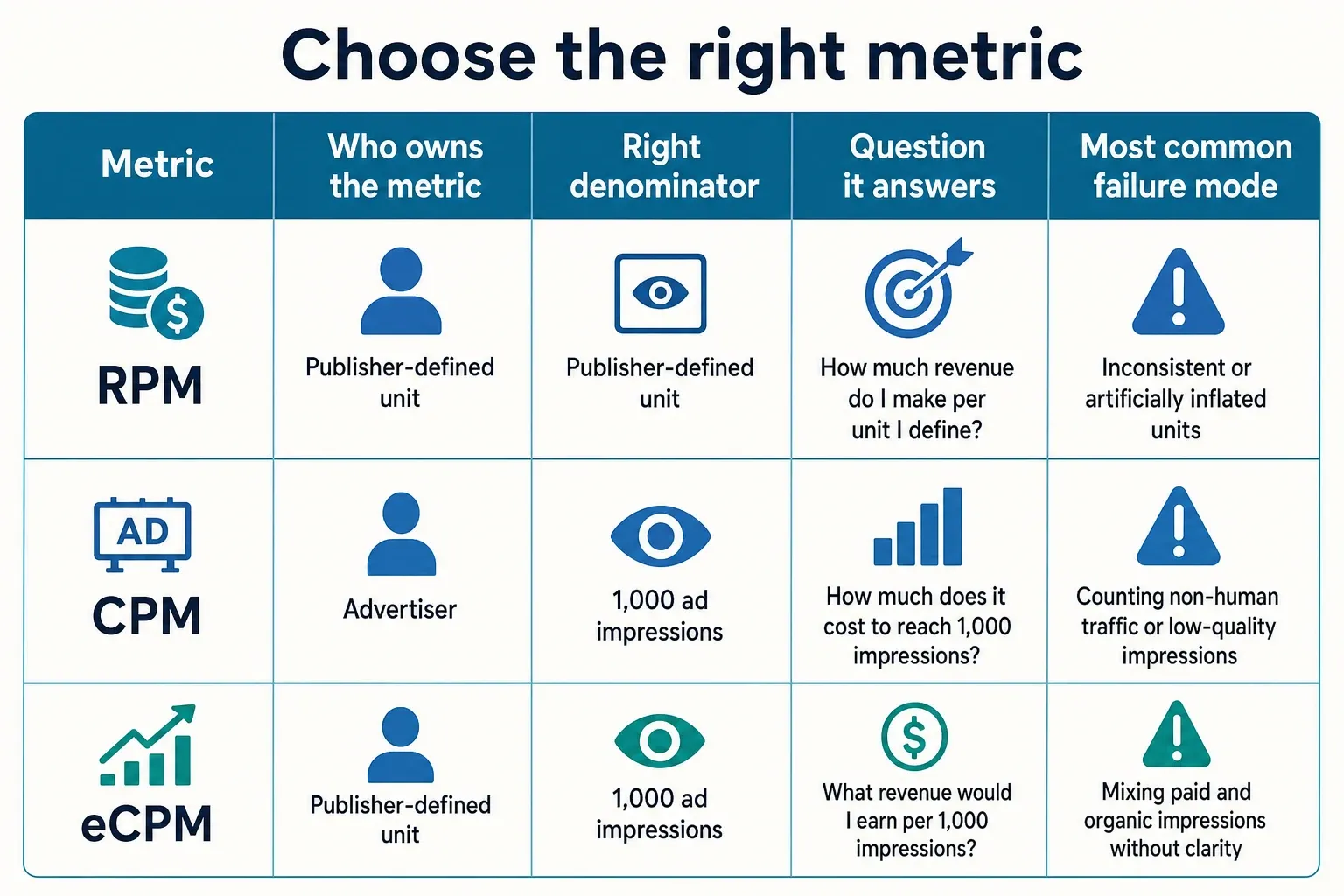
| Metric | Who owns the metric | Right denominator | Question it answers | Decision it supports | Most common failure mode |
|---|---|---|---|---|---|
| RPM | Publisher revenue and yield teams | The publisher-defined unit: often pageviews, monetizable pageviews, or impressions depending on the platform | How much revenue do we generate per 1,000 units? | Property, section, or inventory monetization assessment | Misleads when the report does not state whether the denominator is pageviews, monetizable pageviews, or impressions; Oraki and MonetizeMore both show the term used in publisher revenue contexts Oraki |
| CPM | Advertisers, buyers, sales, and demand diagnostics | Ad impressions purchased or priced | What does a buyer pay for 1,000 impressions? | Direct pricing, floor strategy, deal evaluation, demand-source pressure | Looks healthy even when page revenue is weak because it ignores fill, page depth, and total monetizable volume; NitroPay describes CPM as campaign spend per 1,000 impressions NitroPay |
| eCPM | Ad ops, programmatic yield, demand partner management | Ad impressions served or monetized | How much revenue did this unit, bidder, format, or demand path produce per 1,000 impressions? | Ad-unit comparison, bidder evaluation, AdX versus header bidding analysis | Can push teams toward a high-rate unit that adds little page revenue or hurts the session; eCPM is still impression-based, not journey-based |
| Page RPM | Publisher yield, product, and editorial operations | Pageviews or monetizable pageviews | How much revenue does this page or template generate per 1,000 pageviews? | Template ranking, placement tests, ad load decisions, content monetization planning | Overstates quality if traffic source, device mix, seasonality, or consent eligibility differs from the comparison set; Refinery89 ties RPM to monetizable pageviews Refinery89 |
| Session RPM | Revenue leadership, product, audience development | Sessions | How much ad revenue does a visit generate across the journey? | Recirculation strategy, gallery economics, infinite scroll, video-to-article paths | Can hide a bad first-page experience if later pages monetize well, or penalize high-intent single-page visits that still have strong page RPM |
How to use RPM to compare pages, formats, and content types
RPM comparisons only work when the inventory units are similar enough to support a decision. Rank templates and content types by page RPM first. Then use ad-unit eCPM and fill to explain why the winners are winning and where the losers are breaking down.
- Compare templates before sections. A news section can contain live blogs, standard articles, video posts, slideshows, and explainers. The layout often explains revenue differences better than the editorial label because slot count, scroll depth, and refresh eligibility change by template.
- Break out long-form, galleries, homepages, and utility pages. Long-form pages may have more opportunities for in-content impressions; galleries may create more pageviews or screen changes; homepages often have high visibility but different user intent. One blended RPM hides those mechanics.
- Normalize traffic source when the spread is large. Search visitors, newsletter readers, social traffic, and direct loyal users behave differently. If a finance explainer gets search traffic in January and a sports live blog gets direct traffic on a Sunday night, the RPM comparison needs cohorts, not a leaderboard.
- Separate device views. Desktop, mobile web, and tablet layouts can have different slot maps, viewability, and demand. A sticky unit that lifts mobile page RPM may have no equivalent on desktop, so a blended template report can point the team toward a placement that only works on one device class.
- Use RPM to decide where to test ad load. If a template has strong page RPM but poor session RPM, the next test may be reducing intrusive placements or improving recirculation. If page RPM is weak and ad-unit eCPMs are fine, the problem may be slot opportunity, fill, or eligibility.
- Let CPM explain the cause after RPM identifies the issue. If a template underperforms on page RPM, check AdX CPM, header bidding bid density, fill rate, viewability, and unfilled impressions. Do not start by raising floors just because the blended CPM looks low.
Setting RPM benchmarks by vertical and avoiding bad comparisons
A useful RPM benchmark compares inventory with similar audience value, format, device mix, geography, and demand access. A U.S. finance site, a sports news site, and a lifestyle publisher shouldn’t be held to one shared target because buyers value those audiences and contexts differently.
Build benchmarks from stable cohorts
Start with your own stable cohorts: same vertical, same template, same device group, same primary geography, and the same demand stack. For a mid-to-large U.S. publisher, that usually means separate benchmarks for mobile article pages, desktop article pages, the homepage, video pages, galleries, and any high-volume utility template.
Sovrn argues that RPM matters to publishers because it expresses revenue earned rather than the advertiser’s unit price. Use that distinction internally: benchmark the surfaces you can change, then look at CPM after you know which surface is underperforming Sovrn.
Do not import another publisher’s ceiling
A vertical benchmark from outside your property can help with a sanity check, but don’t turn it into the target in GAM. Finance inventory can pull different demand than lifestyle content. Sports spikes may be event-driven. Entertainment pages can have different scroll behavior and device mix. Treat outside numbers as context, not marching orders.
The cleaner benchmark is internal and cohort-based. Compare this month’s mobile U.S. evergreen finance explainers with the same cohort from prior periods, not with desktop sports live coverage or homepage sponsorship traffic. Then annotate major changes: a new bidder, consent update, floor change, template release, or AdX rule adjustment.
Use CPM as the supporting diagnostic
When a cohort misses its RPM range, move down the stack. Check whether CPM fell across AdX and header bidding together, whether just one bidder softened, whether unfilled impressions rose, whether viewability changed, or whether a new layout reduced eligible calls.
That order keeps the team from treating advertiser price as the entire monetization story. RPM shows where the business problem sits. CPM helps explain whether demand played a role.
Next steps:
- Rename reports so page RPM, session RPM, CPM, and eCPM cannot be confused.
- Build benchmarks by template, device, geography, and traffic cohort before setting targets.
- Use RPM to choose what to optimize, then use CPM, fill, viewability, and bidder data to diagnose why it moved.
- Review the first cohort where revenue impact is large enough to matter, not the row with the most dramatic percentage swing.
Frequently asked questions
Is RPM the same as CPM for publishers?
No. CPM is the advertiser-side price for 1,000 impressions, while RPM is the publisher-side revenue view. RPM may be based on pageviews, monetizable pageviews, ad impressions, or sessions, depending on the report, so it tells you what the inventory actually earned rather than what a buyer paid.
Why do publishers care more about RPM than CPM?
Because RPM is closer to real site performance. It captures the effect of fill rate, viewability, ad load, and template layout, while CPM only shows the price one demand source is willing to pay. If AdX CPM rises but revenue per visit stays flat, RPM is the metric that exposes the problem.
Should I use page RPM or session RPM?
Use page RPM when you’re comparing pages, templates, or sections on a per-pageview basis. Use session RPM when the question is visit value, especially on sites where users move through multiple pages in one session. The right choice depends on whether you’re optimizing the page itself or the full content path.
Can CPM be higher while RPM is worse?
Yes. A high CPM can still produce weak RPM if the inventory barely fills, gets little viewability, or sits on a low-traffic template. In that case, the price looks strong on paper, but the page is not monetizing efficiently enough to lift total revenue.
What is a good RPM benchmark?
There is no universal RPM target that makes sense across all publishers. Benchmark it against your own content type, device mix, geo mix, and demand stack, then compare similar cohorts over time. A homepage, an evergreen article, and a gallery should not be judged against the same number.
How we researched this
Sources consulted for this article:
- CPM vs. RPM: The Differences Publishers Should Know
- CPM vs RPM. Metrics every publisher needs to know by heart | Refinery89
- Understanding the Metrics: RPM vs CPM – Nitro
- CPM vs RPM: Differences Every Publisher Must Understand
- Ads for Publishers: RPM vs CPM - Sovrn
- RPM vs CPM Meaning: Formulas & Examples for Ad Optimization