

Private Marketplace (PMP) Deals: A Setup Guide for Publishers
Start with one clean test: one inventory slice, one buyer seat, one SSP path, one floor, and one open-auction baseline you can compare later. A private marketplace deal is only useful if the Deal ID, GAM targeting, priority, floor, and reporting all point to the same lane before traffic goes live.
Key takeaways
- A PMP deal only helps if the inventory, floor, and buyer path are aligned end to end.
- Deal IDs need clean naming, targeting, and reporting logic or you will create reconciling noise.
- Floor prices should protect value without pricing the buyer out of the auction.
- Multiple PMPs can coexist, but only if you prevent targeting overlap and priority mistakes.
- Open exchange still wins on scale; PMPs win when the buyer wants controlled access to specific supply.
What a PMP deal actually does for your revenue stack
A PMP deal gives you a controlled demand lane inside the programmatic stack. It has a buyer, an inventory package, pricing terms, a transaction type, and a Deal ID or equivalent buyer identifier. In Google Ad Manager, Programmatic Direct covers negotiated programmatic transactions such as Preferred Deals, private auctions, and Programmatic Guaranteed, as documented in Google Ad Manager Help.
Separate the jobs before you build anything. GAM decides ad serving, targeting, line-item eligibility, priority, and reporting dimensions. The SSP creates or maps the deal, passes bid and Deal ID data, and enforces exchange-side rules. Prebid passes bidder keys such as price bucket, bidder, size, and deal values into GAM. The DSP buyer controls seat, bid strategy, frequency, brand suitability, and budget pacing.
Why buyers ask for PMP access
The buyer is usually trying to reduce waste in a very specific lane. A DSP seat in The Trade Desk may ask for U.S. sports article pages, logged-in users, 300x250 and 728x90 display, high-viewability placements, or a brand-safe news section because those impressions are hard to isolate cleanly in the open auction. If the ask is vague, push for domain, section, device, format, geo, and seat details before opening access.
That does not mean the buyer will accept any floor you attach to the package. Their bids still have to survive budget pacing, frequency caps, brand suitability filters, creative approval, bid shading, and the DSP’s own supply-path rules. Before activation, confirm buyer seat ID, DSP, deal type, floor, currency, start date, end date if any, sizes, devices, geo, domains or apps, and whether the buyer expects first look, preferred access, or auction competition.
When a PMP is the wrong move
Don’t launch a private auction to rescue weak supply. If the buyer asked for high-viewability U.S. mobile article inventory, do not include placements that miss the buyer’s stated Active View or viewability threshold, sections with broken metadata, refresh slots the buyer did not approve, or pages with inconsistent ad unit naming. A Deal ID makes inventory easier to target; it does not make low-quality supply perform like premium supply.
Also avoid PMPs if your GAM setup is messy. GAM line items compete based on type, priority, targeting, delivery settings, and other rules described in Google Ad Manager line item types and priorities. Overlapping sponsorships, stale price-priority line items, unmaintained key-values, and undocumented header bidding rules make deal delivery look random. The measurement question is blunt: did the PMP add demand, or did it just re-label revenue that would have cleared anyway?
How to set up deal IDs in Google Ad Manager
Google Ad Manager setup works only when the deal terms, inventory targeting, and ad server priority all point to the same buying path. Use Programmatic Direct for GAM-managed negotiated programmatic deals, and use the SSP deal screen for non-Google demand. Then mirror the targeting in GAM so the line item, key-values, creative sizes, and reporting dimensions match the commercial terms in Google Ad Manager Help.
- Create the deal with minimum commercial metadata. Capture the buyer seat or DSP, seller account, deal type, currency, start date, end date, floor or fixed price, allowed inventory, allowed formats, and whether the buyer expects first look, preferred access, or private auction competition. If the deal comes through Google AdX, keep the deal record and buyer mapping inside the Google path. If it comes through Magnite, PubMatic, OpenX, or Xandr, confirm how the Deal ID is passed back into GAM.
- Use a naming convention that survives reporting exports. A useful name includes buyer, SSP, inventory package, geo, device or format, floor, and quarter. Example: TTD_Magnite_USSports_ROS_DesktopDisplay_$8_Q2. That is longer than a pretty sales label, but it lets revenue ops, ad ops, and finance reconcile the same object without guessing.
- Map non-Google deals to the right GAM key-values. In Prebid.js, deal information can be included in ad server targeting keys such as hb_deal and bidder-specific variants, according to Prebid.org. Your GAM line item should target the deal key, the bidder path if needed, and the correct price bucket key. Do not target only the SSP name unless you want every eligible bid from that SSP to compete for the same line item.
- Set the line item priority to match the commercial intent. A private auction should usually compete differently from a guaranteed sponsorship, a house campaign, and standard header bidding price-priority demand. If you use price-priority line items for Prebid demand, verify that the PMP line item does not accidentally sit below open exchange line items with broader targeting and more aggressive price buckets.
- Target inventory narrowly enough to honor the promise, but not so narrowly that delivery dies. If the buyer bought U.S. mobile web homepage and article pages, do not include app, AMP, outstream, or refresh inventory unless those were named in the package. If you run multiple properties in the same GAM network, validate included ad units at the property level, not only at the parent network level.
- Check creative and format compatibility before launch. A display PMP will not serve into a video ad unit because the buyer liked the audience. Confirm sizes, SafeFrame behavior, native templates, video duration limits, VAST/VPAID policy, and whether multi-size ad slots are eligible. This is where a clean Pubsuite or internal QA view can help catch ad unit mismatches before the buyer sees zero spend.
- Confirm date logic and timezone. Missing end dates create zombie deals that keep appearing in reports. Wrong start dates create buyer-side escalations because the DSP shows an active deal while GAM has no eligible impressions. Use the same launch timestamp in the SSP, DSP, and GAM trafficking notes.
- Run a collision check against AdX, header bidding, and direct-sold rules. A Google AdX preferred deal, an SSP PMP via Prebid.js, and a direct-sold sponsorship can all want the same impression. The ad server will not know your commercial preference unless line-item priority, targeting, and exclusions express it clearly.
How to negotiate floor prices and inventory access without choking demand
Floor price negotiation is a scale tradeoff, so anchor the floor to the exact inventory slice, not the whole network average. Pull the open-auction clearing CPM for the same ad unit, geo, device, format, page type, and date range. Then test whether the buyer can clear above that level without crushing eligible impressions. The floor, inventory package, and buyer access are one negotiation.
| Decision | Use it when | Publisher risk | Negotiation language to use |
|---|---|---|---|
| Hard floor | The buyer wants premium access and you have enough bid density to enforce a clear minimum. Works best for scarce ad units, strong U.S. audiences, or high-demand seasonal packages. | A floor set above the buyer’s practical bid range produces a clean-looking deal with low spend. The report may show a high CPM on a tiny number of impressions. | “We can hold this floor for the homepage and top article units, but we should open adjacent article inventory if daily spend does not pace.” |
| Soft floor or test floor | You are still learning the buyer’s bid behavior, or the package includes mixed-quality inventory. Prebid’s floors module supports floor rules by dimensions such as media type and ad unit in Prebid.org documentation. | If the rule is too loose, the PMP may clear at a price that undercuts the reason you created it. If the rule is too complex, troubleshooting becomes slow. | “Let’s start with the agreed floor on core units and review bid loss by ad unit after the first full delivery week.” |
| Buyer-specific pricing | A named buyer has strategic value, a real spend commitment, or a campaign fit that generic floors do not capture. | Other buyers may see worse access if the same impressions are carved too aggressively for one seat. Sales may also create inconsistent promises across SSPs. | “We can give The Trade Desk seat-specific access through Magnite, but that access should be limited to the named content vertical and U.S. traffic.” |
| Tight inventory package | The buyer needs brand fit, contextual precision, or a curated domain list. Common attributes are geography, device, content vertical, ad unit, page type, and a viewability proxy from your ad server or measurement partner. | The CPM may rise while total net revenue falls because eligible impressions shrink. This is common when desktop-only, above-the-fold, U.S.-only rules stack together. | “If you need only desktop above-the-fold, the floor needs to reflect the lower scale; if you need reach, we should add mobile article inventory.” |
| Broad inventory package | The buyer’s KPI is reach, efficient supply path, or easier activation across several properties. | A broad package can look too close to Open Auction supply if it lacks a clear reason for the buyer to prefer the deal. | “We’ll include all owned-and-operated article inventory, but exclude low-viewability units and non-U.S. traffic so the deal still has a quality boundary.” |
The common mistake is treating the floor like a badge of premium value. A US$18 floor with almost no bids is not premium; it is unsold supply with a nicer label. If the buyer can share SSP or DSP feedback, ask for loss reasons by floor, format, device, geo, and deal ID. “Not scaling” is not actionable; “mobile web 320x50 loses at the floor” is.
How to manage multiple PMP deals without conflicts
Multiple PMP deals stay manageable only when each one has a clear objective, inventory boundary, and priority rule. If two deals target the same ad units, same geography, same device, same dates, and same buyer path, you have created both an auction conflict and a reporting problem. If overlap is intentional, document the tie-breaker: higher priority, higher floor, buyer exclusivity, separate key-value, or separate SSP path. Do not rely on deal names to control serving.
- Prioritize by objective before trafficking. A committed spend package should outrank a speculative test. A seasonal launch with named inventory should outrank an evergreen private auction with broad access. Write that priority in the deal notes, not only in Slack.
- Separate similar deals by a real dimension. Use audience segment, domain, content vertical, ad unit group, geography, device, or time window. “Premium News PMP” and “News PMP Test” are not separate dimensions; they are two names for overlapping supply.
- Protect direct-sold campaigns with explicit exclusions. If a sponsor owns a section takeover, exclude those ad units or page key-values from PMP eligibility during the booked window. Do not rely on line-item priority alone if the same creative sizes and slots are involved.
- Audit duplicate key-values. A Prebid.js line item targeting hb_deal for one SSP should not also catch a second SSP’s deal because someone used a broad bidder key. Check bidder-specific keys when Magnite, PubMatic, OpenX, and Xandr all run inside the same GAM network.
- Watch for price-priority collisions. If your open exchange header bidding line items have thousands of price buckets, a PMP can lose even when the buyer believes it has preferred access. The fix may be a separate priority, a cleaner key-value rule, or a deal-specific line item structure.
- Monitor sudden impression shifts after launch. If one new PMP steals volume from another, cut GAM reporting by deal name, line item, ad unit, device, SSP, and buyer seat for the first delivery window. Do not look only at network revenue; conflicts hide inside blended totals.
- Keep deal ownership visible. Every active Deal ID should have a commercial owner, an ad ops owner, an SSP contact, and a buyer-side contact. Without owner responsibility, stale deals stay live because nobody wants to be the person who turns them off.
A simple comparison of PMP vs. open exchange performance
How to measure PMP lift against open-auction baseline: compare the PMP only against inventory that could have served the same demand. Use the same ad unit, geo, device, format, page type, date range, and eligibility rules. If the deal targeted U.S. mobile web article pages with 300x250 and 320x50 units from 10/01/2025 through 10/07/2025, the baseline must use that same slice, excluding sections blocked by sponsorships or other direct-sold rules.
| Metric | How to read it | Bad interpretation | Action if the read is weak |
|---|---|---|---|
| CPM | Shows the clearing price for impressions the deal actually won. Compare net CPM after fees where your reporting allows it. | “The PMP has a higher CPM, so it is better.” Higher CPM on tiny delivery can still reduce total revenue. | Pair CPM with eligible impressions and net revenue before raising the floor. |
| Fill or delivery rate | Shows whether the buyer can spend against the eligible package. | “Low fill means the buyer is not interested.” It may mean your targeting, floor, or creative format blocked scale. | Break delivery by ad unit, device, and geo to find the narrowest constraint. |
| Win rate | Shows whether the buyer’s bids are competitive inside the eligible auction path. | “Low win rate means the floor is wrong.” It could also mean stronger demand is winning through AdX or another SSP. | Compare win rate against open exchange bids on the same inventory slice. |
| Impression share | Shows whether the PMP is becoming a meaningful demand lane or staying as a small test. | “Any impression share is incremental.” It may be replacing open demand you would have won anyway. | Check whether Open Auction revenue fell on the same ad units after launch. |
| Net revenue | Shows the actual publisher outcome after price, volume, and fees. | “Deal revenue is new revenue.” A deal can move revenue from Open Auction into a named path without adding dollars. | Use a baseline period and a matched control slice where the deal was not eligible. |
Separate three numbers in the first read. CPM lift is the PMP CPM minus the matched open-auction CPM for the same eligible slice. Incremental revenue is the change in total net revenue for that slice after launch, not just the PMP revenue line. Cannibalized open-auction demand is the open-auction revenue that disappeared from the same eligible inventory while the PMP grew.
The cannibalization signal is easy to spot in a controlled comparison. If PMP revenue rises by US$10,000 while comparable open-auction revenue falls by roughly US$10,000 and total net revenue stays flat, the deal may have improved buyer control without improving publisher yield. That may still be worth keeping for a strategic buyer, but do not call it yield lift. If total net revenue rises while open-auction revenue holds steady or falls by less than the PMP gain, you have a stronger incremental case.
Original framework: the PMP setup checklist you should run before launch
Use a document named Pre-Launch PMP Review and require five criteria before activation. Deal plumbing: buyer seat, DSP, SSP, Deal ID, GAM line item, sizes, currency, and dates match. Inventory packaging: ad units, sections, devices, geo, formats, and domains match the offer.
Floor logic: the floor is tied to matched open-auction data and buyer feedback. Conflict prevention: overlapping direct, sponsorship, PG, and header bidding rules are known. Measurement readiness: deal ID, hb_deal or equivalent keys, ad unit, device, geo, and net revenue are reportable from day one.
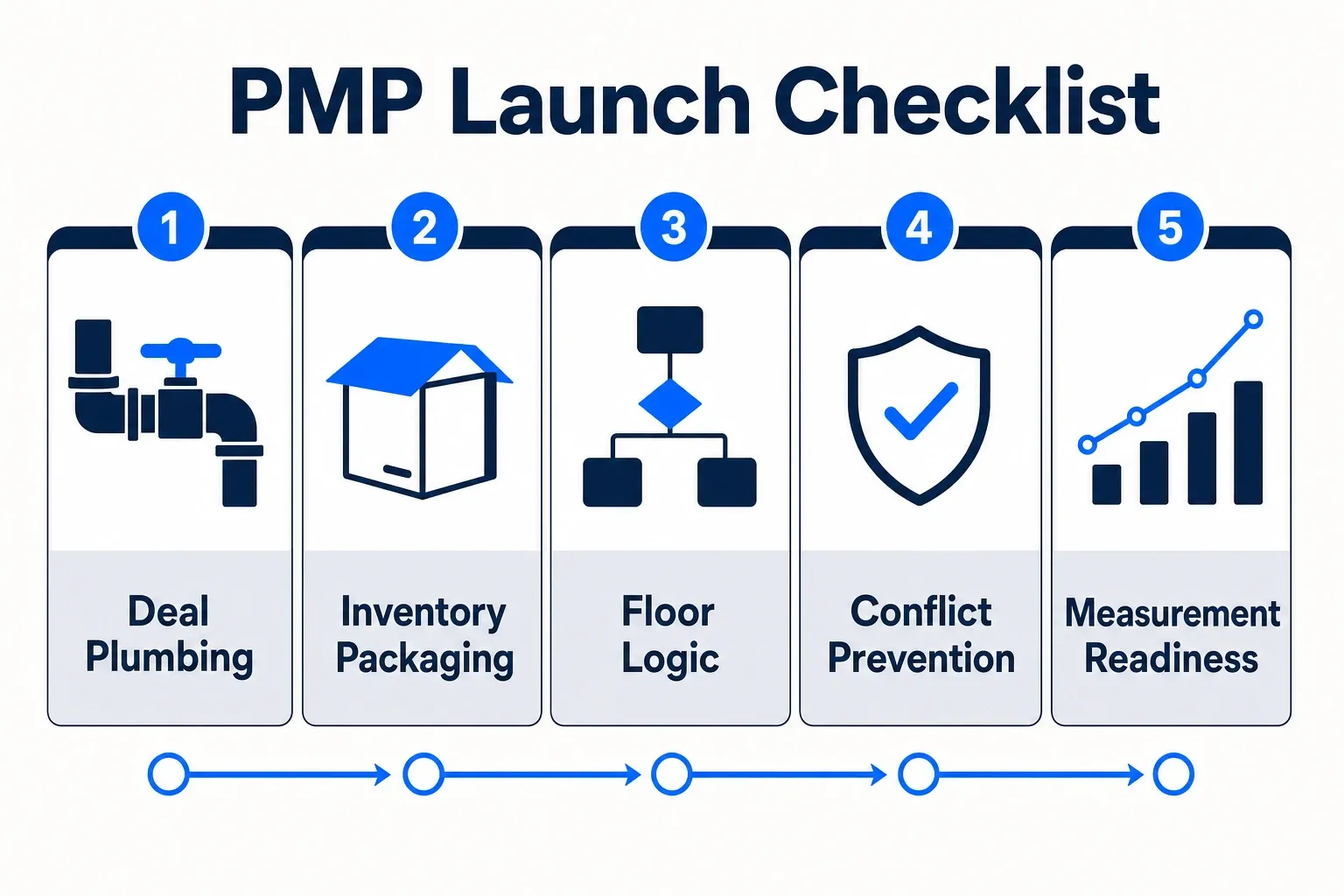
- Deal Plumbing: Confirm the buyer seat, SSP, DSP, Deal ID, currency, start date, end date, transaction type, creative formats, and contact owners. If the deal uses Google AdX, verify the Google path. If it uses Prebid.js, verify the key-values reaching GAM.
- Inventory Package: Confirm included properties, domains, ad units, page types, geography, device, content vertical, refresh eligibility, and excluded sponsorship areas. The package should match the buyer’s IO-style language even if the execution is programmatic.
- Floor Logic: Document the agreed floor, whether it is hard, soft, or buyer-specific, and where it is enforced: SSP, GAM, Prebid.js, or a combination. One undocumented floor can explain an entire week of underdelivery.
- Conflict Prevention: Compare the new deal against active PMPs, direct-sold campaigns, AdX preferred paths, Open Auction header bidding, and house rules. Look for duplicate targeting, broad key-values, and priority settings that contradict the commercial intent.
- Measurement Readiness: Define the baseline before launch. Pick the comparable open-auction slice by ad unit, geo, device, page type, and date window. Decide whether success means net revenue lift, buyer spend, strategic access, or reduced open-market exposure.
- Governance: Apply a naming convention that includes buyer, SSP, package, geo, device or format, floor, and quarter. Assign one revenue owner and one ad ops owner. If nobody owns the deal, nobody will notice slow decay.
- Buyer Feedback Loop: Ask the SSP or buyer for bid loss reasons by floor, format, device, and geo after launch. A single “not scaling” note is not enough to change settings responsibly.
- Launch Gate: Do not activate until the deal can answer four questions: who can bid, what can they bid on, what price logic applies, and what baseline proves whether the deal added value. If one answer is missing, keep it in QA.
Frequently asked questions
What is a PMP deal in programmatic advertising?
Standardize deal naming across properties, SSPs, and exports instead of letting each seller invent a label. Use the same field order every time: property, channel, country, device, environment, format, section, buyer, DSP or seat, SSP, deal type, floor, and start date. Example: NewsSite_Web_US_Mobile_Article_300x250_Sports_AcmeDSP_TTD_Magnite_PrivateAuction_USD12_2025-10-01. Keep the Deal ID in a separate reporting field; do not bury it only in the name.
Where do I create deal IDs in Google Ad Manager?
You typically set up Google demand inside GAM’s Programmatic Direct or AdX workflow, then map the Deal ID to the right inventory, targeting keys, and line-item priority. For Prebid demand, confirm that the bidder sends deal information into ad server targeting and that GAM has the matching key-values. Prebid documents ad server targeting keys, including deal-related targeting such as hb_deal, in Prebid ad server targeting.
Do PMP deals always outperform open exchange?
No. A PMP can improve CPM and still hurt the business if fill drops, direct-sold delivery gets constrained, or open-auction demand simply moves under a new label. The decision rule is simple: keep the deal if matched-slice net revenue, buyer value, or strategic access improves after accounting for cannibalization. Pause or reprice it if the only visible win is a higher deal CPM on fewer impressions.
How many PMP deals can I run on the same inventory?
Run as many private marketplace deals as your stack can govern without losing attribution. Each live deal needs an owner, buyer seat, SSP path, Deal ID, targeting map, floor history, conflict notes, and measurement baseline. If multiple deals share the same ad units, buyer pool, and targeting, use explicit priority rules and clean key-values so one deal does not starve another or blur reporting.
What should I measure first after launch?
Start with deal-specific CPM, fill, win rate, eligible impressions, matched open-auction CPM, open-auction revenue change, and total net revenue for the same slice. Then decide whether the PMP added demand or shifted impressions out of broader demand paths without lift. Sources: Google Ad Manager Programmatic Direct; Google Ad Manager line item types and priorities; Prebid ad server targeting; Magnite/Rubicon Prebid bidder documentation; PubMatic Prebid bidder documentation; OpenX Prebid bidder documentation; Xandr/AppNexus Prebid bidder documentation.