

Header Bidding Timeout Configuration: Finding the Sweet Spot
Start your header bidding timeout configuration around 1000 ms, then break it out by device, format, and bidder behavior. Keep fast desktop display auctions tight. Give high-value units or video more room, and handle chronic late bidders separately instead of widening the whole wrapper so every user waits for one slow demand path.
Key takeaways
- A single site-wide timeout is usually too blunt for mixed inventory and mixed bidder behavior.
- Start around 1,000 ms, then adjust only where the bid recovery justifies the added wait.
- Mobile and high-traffic page types usually expose bad timeout policy faster than desktop.
- Slow bidders should be isolated or dropped, not allowed to stretch the whole auction window.
- Test timeout changes in controlled segments so you can compare revenue against latency without polluting the result.
Why timeout settings affect both revenue and page speed
Timeout length is the point where your auction stops waiting and moves on, so each extra millisecond trades possible recovered bids for slower ad decisioning. Setupad calls 1000 ms a common auction timeout in header bidding setups, which makes it a solid baseline to test from, not a universal answer Setupad.
Set the timeout too short and you cut off bids that could have cleared above Google Ad Manager competition. Let it run too long and you slow the page, delay ad rendering, and risk damaging the session that would have created the next impression. That pain almost never lands evenly across the site.
The revenue side: late bids are not all equal
A late bid from a weak bidder on a low-viewability sidebar does not deserve the same wait as a late bid from a premium SSP on an above-the-fold article unit. That’s where one site-wide number falls apart. It assumes every bidder, placement, device, and user connection has the same marginal value.
Prebid.js gives publishers a wrapper-level timeout control, but the real operational question is not just where to enter the number. Hashtag Labs HTL, for example, documents the timeout under Header Bidding and Prebid Configuration. It’s easy to change, and just as easy to misuse if you push it globally without segmenting the impact Hashtag Labs HTL.
The latency side: mobile usually exposes bad policy first
Mobile web is where a lazy timeout policy shows up first. Slower connections, limited CPU, heavier pages, and fast scroll behavior can turn a small auction delay into lost viewability or an ad that renders after the user has already moved past the slot.
Desktop may handle a wider auction window on a high-intent page. Mobile traffic from social referrals may not. If one global number covers both, your header bidding timeout configuration is probably waiting too long for some impressions and cutting others off too early.
Default timeout benchmarks by device
A practical timeout benchmark is 1000 ms for standard display, then shorter or longer only when device, format, and bidder response data support the change. Prebid.org documents timeouts as a core Prebid.js feature, including display and video use cases, so treat the default range as a starting control rather than a permanent setting Prebid.org.
| Inventory segment | Starting timeout | When to tighten | When to loosen | Operational note |
|---|---|---|---|---|
| Desktop display | Around 1000 ms | High viewability loss, fast bidder set, low incremental bid density after the cutoff | Premium desktop sections where late bids regularly beat the ad server line item competition | Keep the first test simple: one desktop segment, one timeout change, no floor change at the same time. Setupad’s 1000 ms benchmark is the reference point Setupad. |
| Mobile web display | Often below or near 1000 ms | Social traffic, infinite scroll, low session depth, heavy JavaScript, weaker connection quality | High-value logged-in or subscription-adjacent pages where users stay long enough for ads to render | Do not copy desktop settings to mobile by default. Mobile latency can turn a technically filled impression into a poorly viewed impression. |
| Video inventory | Often needs separate treatment from display | Short-form pages where the player must load quickly or where ad start delay hurts consumption | Instream or high-value video where auction pressure is materially different from banner demand | Prebid.org separates video timeout guidance from standard display documentation, which is a strong signal to manage video policy separately Prebid.org. |
| High-latency bidder population | Segment before extending the global timeout | If one bidder or region causes most late responses | If a specific bidder wins high-value impressions just after the cutoff | Use bidder-level timeout analysis before rewarding the entire stack with more time. Consult.tv recommends starting server-side latency work at bidder level Consult.tv. |
The benchmark helps because it gives your control group a recognizable center. The mistake is turning that center into policy. A publisher running multiple properties, mixed mobile share, and both display and video demand should expect several timeout answers, not one blanket setting.
Adaptive timeout strategies that make sense in production
A production-safe adaptive strategy changes timeout rules by segment, not by gut feel, and it keeps every auction from becoming a custom science project. Wait longer only where the recovered bid value justifies the drag. Keep commodity inventory fast, predictable, and easy to monitor.
- Create segments that match operational reality: device type, geo, ad format, property, placement group, consent state, or bidder group. For a U.S. publisher, that might mean separating desktop article pages, mobile AMP replacement pages, video player inventory, and logged-in audience pages rather than editing one Prebid.js timeout across the account.
- Assign a conservative baseline to low-margin inventory. If a mobile mid-article unit rarely wins above your Google Ad Manager competition after 800–1000 ms, it should not inherit a longer timeout just because a homepage takeover benefits from one.
- Give higher-value inventory permission to wait, but only inside a bounded rule. A top-of-page desktop unit with strong direct-sold competition may deserve a wider auction window than a below-the-fold recirculation slot, especially if historical bid data shows real competition near the cutoff.
- Group bidders by behavior instead of treating every SSP as equal. Fast, consistent bidders can stay inside the main timeout. Bidders with valuable but late demand can be isolated into a longer segment if they justify it. Chronic timeout offenders should not force a site-wide extension.
- Keep server-side header bidding separate from client-side logic. In Prebid Server setups, the server-side timeout needs room inside the total auction window rather than matching it exactly; Consult.tv specifically recommends keeping the PBS timeout below the overall auction timeout with a buffer Consult.tv.
- Document the rule owner and rollback condition. Timeout policy touches revenue, user experience, and engineering performance work, so the change log should show the segment, old value, new value, launch date, and the metric that would trigger reversal.
Adaptive does not need to mean algorithmic. For most yield teams, the first real step is segmented policy: one timeout for fast desktop display, one for mobile-heavy traffic, one for video, plus exceptions for bidder groups that have earned the extra room.
How to measure bidder response times without fooling yourself
Measure bidder response time at the bidder and segment level, because an aggregate average can hide the exact latency that is costing you money. Pubstack frames timeout optimization around bidder responses, no-bids, and missed responses, which is the right operational lens for separating useful wait from wasted wait Pubstack.
- Run bidder-level timeout analysis, not just wrapper-level reporting. If the auction timeout is 1000 ms and two bidders regularly respond after that mark, the fix is not automatically 1200 ms for everyone. It may be bidder isolation, adapter review, or removal from specific segments.
- Read distributions instead of the mean. A bidder with a clean median and a long slow tail can look acceptable in a dashboard average while still timing out on enough auctions to distort your decision. Compare median, upper-tail behavior, timeout count, bid rate, and win contribution in the same view.
- Separate no-bids from late bids. A bidder that responds quickly with no demand is a different problem from a bidder that returns monetizable bids after the cutoff. One is demand quality; the other is timing. Do not solve both by increasing the global timeout.
- Match the measurement window to traffic shape. A weekday desktop news audience, Sunday mobile lifestyle traffic, and event-driven spikes can produce different latency patterns. If you blend them, you may tune the wrapper for an average day that does not exist.
- Compare client-side and server-side paths separately. Server-side header bidding can reduce browser work, but it adds its own network path and Prebid Server timeout behavior. Consult.tv’s guidance to keep PBS timeout below the total auction timeout matters because equal values can leave no buffer for the rest of the ad call chain Consult.tv.
- Check the ad server handoff. Your Prebid.js auction can look healthy while Google Ad Manager receives fewer eligible keys than expected because bids arrive too late, targeting is inconsistent, or refresh logic collides with the timeout. The timeout number is only useful if the winning bid is eligible when the ad server decision happens.
- Do not let a single premium bidder dictate policy without placement proof. If a slow bidder wins only on a small set of high-CPM pages, segment that inventory. If it rarely wins anywhere, longer wait time is just latency disguised as optionality.
The strongest signal is not “bidder X is slow.” It’s “bidder X is slow on mobile web, but its late bids on two above-the-fold placements clear above competing demand often enough to justify testing a longer segment.” That kind of specificity keeps timeout work from turning into wrapper folklore.
Which timeout policy fits which inventory problem
The right timeout policy depends on your main constraint: operational simplicity, uneven traffic quality, or bidder response variability. Fixed, segmented, and adaptive policies can all work in the right environment. The failure mode is sticking with the simplest policy after the stack has clearly outgrown it.
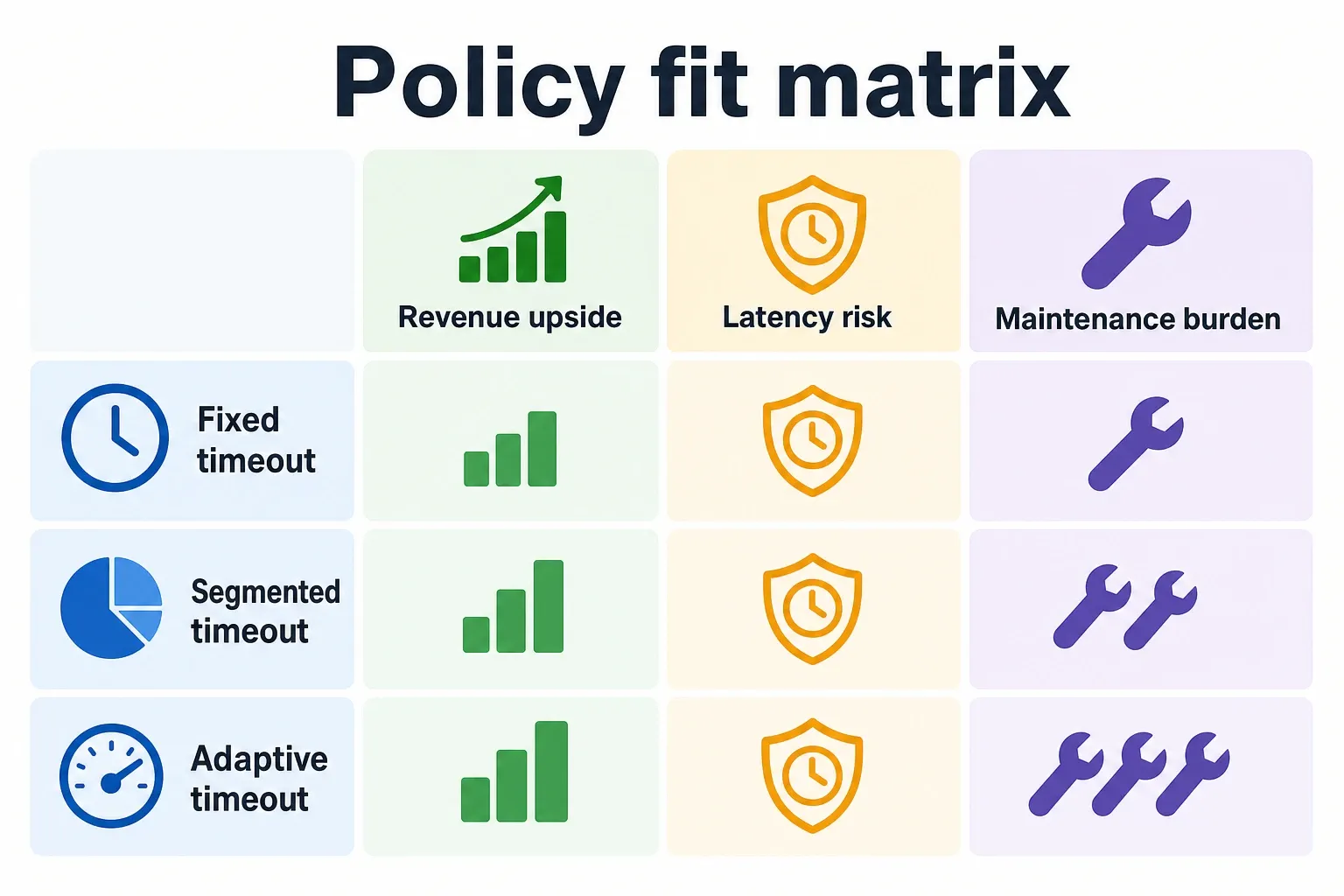
| Policy | Revenue upside | Latency risk | Maintenance burden | Best-fit inventory types | Evidence anchor |
|---|---|---|---|---|---|
| Fixed timeout | Lowest upside once inventory becomes diverse, but useful as a clean baseline and control group | Predictable, but can over-wait on mobile and under-wait on premium placements | Low: one value to govern and easy rollback | Smaller display setups, stable desktop-heavy sites, early Prebid.js deployments, Microsoft Monetize Ad Server integrations where simplicity is still the priority | Prebid.org documents timeout configuration as a standard Prebid.js feature, which makes a fixed value easy to implement Prebid.org. |
| Segmented timeout | Strong upside where device, format, property, or placement economics differ | Moderate: latency is contained to the segment that earns the extra wait | Medium: requires naming rules, reporting cuts, and QA across Google Ad Manager targeting paths | Mid-to-large publishers with mobile-heavy traffic, mixed display and video, multiple properties, or different bidder mixes by section | Hashtag Labs HTL shows the timeout can be changed at the Prebid configuration level, but the value comes from applying that control selectively Hashtag Labs HTL. |
| Adaptive timeout | Highest upside when slow response behavior is real, measurable, and concentrated in valuable impressions | Highest if poorly governed; controlled if bounded by segment, bidder, and rollback rules | High: needs bidder-level analysis, distribution monitoring, and release discipline | Large yield operations with enough volume to evaluate bidder tails, server-side header bidding paths, video demand, and premium audience segments | Consult.tv recommends bidder-level timeout analysis and PBS buffer management, which are prerequisites for responsible adaptive policy Consult.tv. |
For high-volume display, segmented usually wins because it captures the biggest practical improvement without forcing a custom timeout decision on every auction. For mobile-heavy traffic, shorter segmented rules often protect page speed better than one long default. For slower bidders, adaptive treatment is justified only when response-time distribution and win data prove the late demand is worth the wait.
How to test timeout changes safely
Safe timeout testing changes one variable at a time and evaluates revenue, auction behavior, and page experience together. If you raise the timeout, change floors, add bidders, and adjust refresh rules in the same week, you will not know which lever actually moved the number.
- Pick one segment with enough volume to read cleanly. A good candidate is a placement group where you already see meaningful timeout counts or late bid behavior, such as mobile article pages or desktop top-of-page units. Avoid starting with a tiny premium package where random campaign mix can overwhelm the result.
- Freeze the control group. Keep the old timeout live for a comparable slice of traffic while the test group receives the new value. Do not change bidder settings, price floors, Google Ad Manager line item priority, refresh timing, or consent logic during the test unless the timeout test is paused.
- Define the full scorecard before launch. Include revenue per session or pageview, CPM, bid rate, timeout rate, win rate, viewability, ad render timing, and Core Web Vitals-related page speed signals available to your team. A timeout that lifts CPM while lowering viewable impressions may be a bad trade.
- Watch bidder drop-off by name. If a timeout reduction improves page speed but removes bids from a high-value bidder, you need to know whether those lost bids were actually winning. If a timeout increase mostly recovers bids that never clear, roll it back.
- Treat client-side and server-side tests as separate experiments. A Prebid.js timeout change in the browser affects user-side auction wait directly. A server-side header bidding change may require a Prebid Server timeout adjustment, plus a buffer below the total auction timeout so the rest of the request chain can complete.
- QA the ad server targeting path. Confirm that bids arriving inside the new timeout are reaching Google Ad Manager with expected key-values, price buckets, and creative eligibility. A higher timeout is useless if bids are technically returned but fail to compete in the ad server.
- Roll out in stages and keep the rollback value ready. Move from one property or segment to a broader rule only after the test survives normal weekday traffic, weekend traffic, and at least one higher-load period relevant to your publication cadence.
Use 1000 ms as the control, not the religion. Tighten where latency is killing the impression before it can be viewed. Extend only where bidder-level distributions show valuable demand arriving late, and keep server-side buffers intact. The best header bidding timeout configuration is the one your yield team can defend with segment data and roll back without guessing.
Frequently asked questions
What is a good default for header bidding timeout configuration?
Start with 1000 ms. It’s a practical baseline for standard display inventory, and Prebid documentation treats it as a common timeout point, not a fixed rule. From there, tune by device, format, and bidder behavior so you’re not giving every impression the same wait time.
Should mobile and desktop use the same timeout?
Usually not. Mobile traffic tends to need a different header bidding timeout configuration because slower connections, lower device performance, and more aggressive user scrolling make delay more expensive. Desktop article pages can often tolerate a slightly wider window than mobile units, but only if the bid data supports it.
How do I know if my timeout is too short?
If strong bidders are timing out regularly and revenue improves when you give the auction more room, the timeout is probably too aggressive. A bad sign is when you keep cutting off bids that still had a realistic chance to beat Google Ad Manager competition, especially on higher-value placements.
Does server-side header bidding need a different timeout?
Yes. The server-side timeout should sit inside the total auction window, with enough buffer for the PBS path to return before the page-level cutoff. If you set it too close to the outer limit, you lose the point of server-side bidding because the response arrives after the wrapper has already moved on.
What should I measure after changing the timeout?
Track revenue, timeout rate, bidder-level latency, and page speed together. A longer timeout only helps if the added bids are worth the extra delay, and you need to watch whether page rendering or session quality gets worse. The winning setting is the one that improves yield without making the page feel slower.
How we researched this
Sources consulted for this article:
- Adjust Header Bidding Timeout
- Deconstructing the Header Bidding Auction - Setupad.com
- Prebid Ad Slot for Header Bidding
- Video Intro to Timeouts in Prebid.js for Header Bidding
- Measuring and Reducing Latency in Server-Side Header Bidding
- How to Optimise your Prebid Timeouts for High Yield and Optimal User Experience