

Header Bidding for Mobile Web: What Changes and Why
Your mobile article page loads, the first ad slot is waiting on bidders, and the user is already moving down the page. Header bidding for mobile web needs separate settings because the auction has less time, less screen space, and more network variance than desktop. Copy the desktop wrapper and you usually get late bids, heavier pages, and mobile revenue you didn’t need to lose.
Key takeaways
- Mobile web needs its own auction settings; desktop defaults usually miss the timing window or add too much weight.
- Timeouts should follow the actual mobile render path, not a generic wrapper default.
- Only keep adapters that can return usable bids fast enough on mobile traffic.
- Lazy loading changes when the auction starts, so viewability and scroll depth matter as much as raw bid rate.
- AMP and other constrained environments limit what you can run, so test the stack against the template, not the theory.
What Changes on Mobile Web vs. Desktop
Mobile web changes the limits you’re working inside. The same Prebid.js setup can run in a browser, sure, but the page has far less tolerance for request weight, delayed rendering, and slow bidder responses. A desktop stack can still technically work while losing auctions because the timeout closes before usable demand gets back.
The auction flow still looks like desktop: demand gets a shot before the ad server call, as header bidding primers from AppsFlyer and Adjust explain. What changes is everything around that flow. On mobile, content, ads, analytics, consent, and UX scripts are all fighting inside a much tighter performance budget.
Mobile web is not in-app inventory
Don’t bring app-side assumptions into browser traffic. Digiday’s mobile header bidding coverage drew the line clearly: ‘in-app header bidding’ is a stretched label because an app does not have a browser header, and Flurry’s analysis cited there found that only 15% of U.S. app time was spent in ‘music, media and entertainment’ apps, the closest proxy it had for publisher apps Digiday.
That distinction matters in the day-to-day setup. Mobile web runs through browser limits, publisher tags, and page-performance rules; app monetization depends more on SDKs, mediation, and app-specific auction paths. Postindustria covers in-app bidding as an app monetization model, but that doesn’t make it the same thing as mobile browser header bidding Postindustria.
The practical consequence
A wrapper that looks tidy on desktop can fail quietly on mobile. The ad slot may become eligible later, the user may scroll past it faster, or the bidder response may land after the ad server has already made the call. In reporting, that shows up as thin mobile bid density, more unfilled on below-the-fold units, or partners that appear active but rarely win on phones.
Treat mobile web as its own stack decision. Same publisher, same Google Ad Manager network, same demand contracts. Different timeout, different bidder list, different lazy-load rules, and different diagnostics.
Latency, Timeouts, and Auction Windows on Mobile
Mobile timeout tuning is a revenue control, not a cosmetic speed setting. Every extra millisecond can bring in more bids, but it can also hold the ad server call and push rendering past the moment the user still cares. The timeout has to match how the mobile page actually loads.
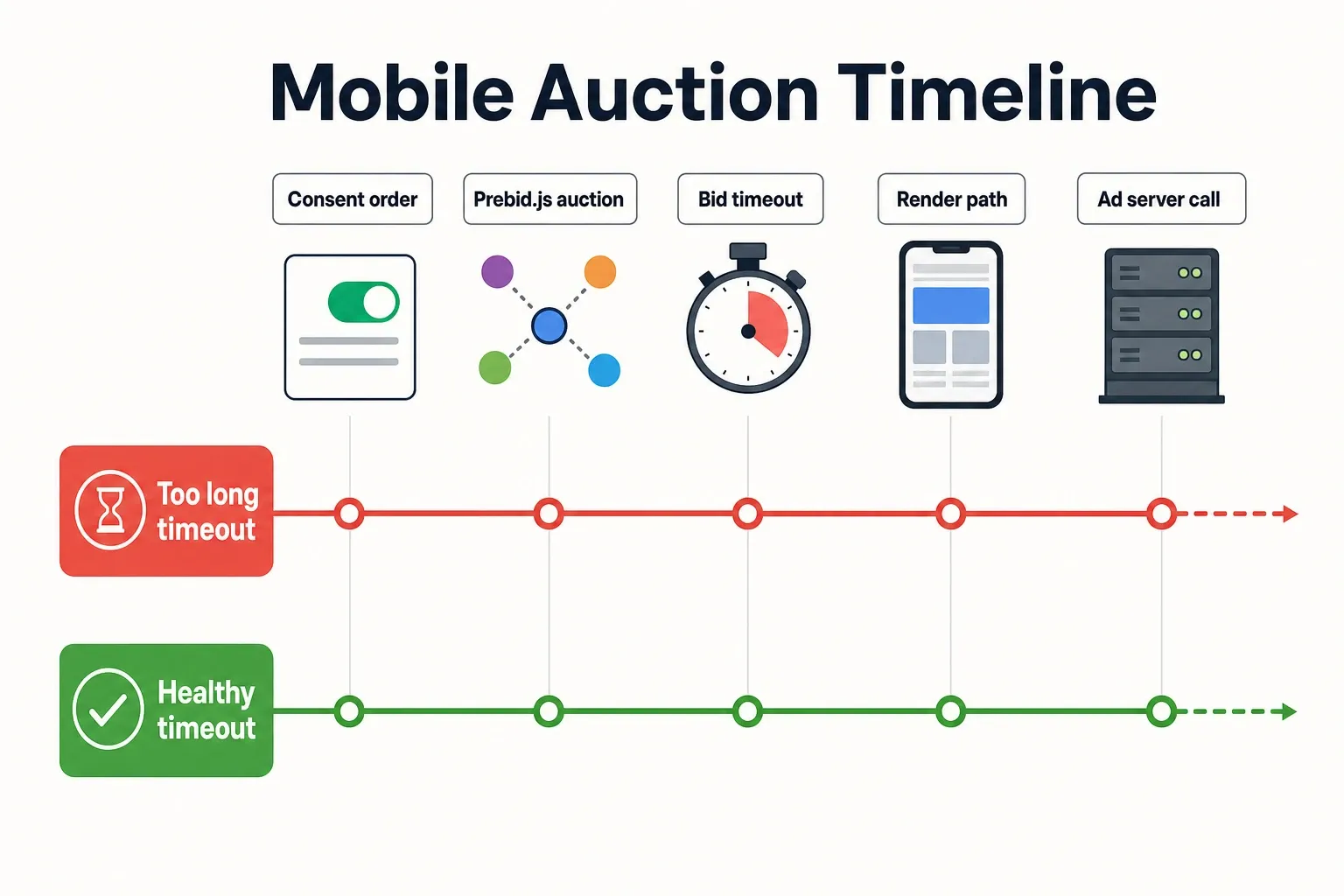
- Start with the mobile render path, not the bidder list. Map the order of consent, Prebid.js, content rendering, Google Publisher Tag, Google Ad Manager request, and creative render for the top mobile templates. Prebid.js lets publishers configure auction behavior through its API, including timeout-related settings, so confirm what is actually deployed rather than relying on a wrapper UI label Prebid.js documentation.
- Compare the bid timeout against slot eligibility. If lazy loading prevents a below-the-fold slot from requesting until the user nears it, the auction window starts later than the pageview. A long timeout on that slot may still be too late because the user has already scrolled past the viewable opportunity.
- Separate late bids from no bids. In Google Ad Manager and Prebid reporting, look for mobile ad units where bidders return prices but lose because they miss the auction, versus partners with low mobile bid rate from the start. Those are different fixes: one points to timing, the other to adapter fit or demand quality.
- Segment by device class and page type before changing the global value. A high-end iPhone on Wi-Fi and an older Android device on a congested connection should not be averaged into one mobile number if your traffic volume supports cleaner cuts. Use the same logic for article pages, galleries, live blogs, and home pages.
- Protect Core Web Vitals while testing timeout changes. Google’s Core Web Vitals focus on loading, interactivity, and visual stability, which means a timeout that lifts auction participation can still be a bad trade if it worsens perceived speed or layout behavior on ad-heavy templates web.dev.
The common mistake is optimizing for the highest bid response rate instead of the highest usable bid response rate. On mobile web, a bid that shows up after the slot opportunity is gone is just noise, even if the bidder dashboard makes demand look healthy.
Adapter Support: Which Bidders Actually Belong in the Mobile Web Stack
A mobile bidder should stay in the stack only if it brings timely, differentiated demand on mobile browser traffic. Prebid.js can support open-web desktop and mobile web use cases, but that doesn’t mean every adapter deserves the same timeout budget or the same placement coverage Smaato.
| Adapter profile | Mobile-web fit test | Keep when | Trim first when | Evidence anchor |
|---|---|---|---|---|
| Core broad-demand adapter already active in Prebid.js | Check mobile bid rate, timeout rate, win rate, and revenue share by ad unit | It wins unique mobile auctions without pushing the page past the timeout | Another path supplies the same demand with less latency | Prebid.js is positioned for open web and mobile web usage by Smaato |
| Desktop-strong adapter with weak phone performance | Compare desktop vs. mobile web participation on the same placements | It has a clear mobile buyer pattern on specific templates | It bids on desktop but rarely clears mobile timeout or wins on phones | Mobile web can resemble desktop mechanically, but implementation still depends on the browser environment Ads Interactive |
| Heavy bidder configuration | Review request weight, enabled modules, user ID calls, media types, and floor logic | The revenue lift justifies the extra work on mobile pages | The partner adds requests but contributes little incremental mobile yield | Core Web Vitals make page weight and responsiveness part of the business tradeoff web.dev |
| Redundant demand path | Compare buyer overlap, win patterns, and clearing prices across exchanges | It creates incremental price pressure or accesses a buyer you cannot reach elsewhere | It duplicates another partner and mostly loses at similar CPMs | Header bidding’s value comes from simultaneous exchange competition, not unlimited partner count AppsFlyer |
| AMP-specific path | Validate whether the AMP monetization route supports the bidder setup you want | The bidder can operate inside AMP’s allowed ad configuration | The standard mobile web adapter requires patterns AMP will not allow | AMP ad behavior is governed by AMP components and rules AMP documentation |
The easiest cut is often the partner that looks fine in the rollup and vanishes once you filter to mobile web. Don’t remove demand because it was slow one time. Remove it when it is slow, redundant, and still can’t win after you isolate the traffic it was meant to monetize.
The next cut may be configuration, not the adapter. If a bidder earns its keep on top article slots but drags on galleries, keep it where it works and pull it from the page types where mobile behavior makes the auction too brittle.
Lazy Loading, Viewability, and Mobile Scroll Behavior
Lazy loading can help mobile pages by holding work until an ad slot is closer to view, but it can hurt header bidding if the auction starts so late that bids arrive after the user has moved on. Trigger distance, slot type, and scroll speed decide whether it protects revenue or starves demand.
Where lazy loading helps
On long article pages, lazy loading can keep initial page weight under control by holding lower slots until they have a real chance to be seen. Google Publisher Tag supports lazy loading with configurable fetch and render margins, giving ad ops a direct lever instead of one all-or-nothing switch Google Publisher Tag samples.
The mobile benefit is strongest when the first viewport is already crowded: headline, hero image, navigation, consent layer, and a top ad. Deferring lower slots can cut early work and make the page feel faster without giving up the first auction.
Where it breaks the auction
Below-the-fold units tend to break first because their auction starts after the pageview is already moving. If the fetch margin is too tight, Prebid.js has very little time to call bidders, receive bids, pass keys to Google Ad Manager, and render the creative before the slot enters view.
Sticky ads need their own rule. They may stay viewable longer, but they also compete with navigation, consent banners, and basic small-screen usability. A sticky unit that loads late can look viewable in one report and still underperform because the auction didn’t get enough demand.
High-speed scroll environments are the hardest version of this problem. Slideshows, recipe pages, live updates, and short news posts can make slots eligible faster than the wrapper can run a healthy auction. On those templates, moving the lazy-load trigger earlier often beats raising the bid timeout because it gives the auction more runway without holding the whole page hostage.
AMP and Mobile Header Bidding Limits You Can’t Ignore
AMP is its own monetization environment, so your standard mobile web header bidding stack may not map cleanly to AMP pages. The real constraint is usually less about demand strategy and more about what AMP components allow the page to execute.
Why AMP needs a separate plan
Standard mobile web header bidding usually assumes publisher-controlled JavaScript running on the page. AMP restricts arbitrary JavaScript and routes ads through approved components, so monetization has to follow AMP-supported patterns instead of your normal wrapper deployment AMP documentation.
That changes how you operate it. You may need fewer bidders, alternate real-time configuration paths, or a separate demand setup for AMP inventory. The right call depends on how much AMP traffic you still have, which placements matter, and whether the extra operational work pays back.
The decision point
If AMP is a meaningful traffic segment, measure it like its own product line. Don’t blend AMP and non-AMP mobile web into the same yield readout, then blame the wrapper for gaps caused by different execution rules.
If AMP is small or shrinking, standardizing on fewer bidders may be the better move. A complex AMP setup that needs special QA, separate reporting, and partner exceptions can cost more operationally than the extra competition is worth.
A Practical Testing Checklist for Mobile Header Bidding Performance
A mobile header bidding test is valid only if it separates auction completion, bidder fit, page performance, and revenue impact. Rolling all mobile traffic into one average hides the specific failure you need to fix: timeout, adapter list, lazy-load trigger, or AMP path.
| Mobile-specific criterion | Trigger condition to check | Practical action | What to measure next | Evidence anchor |
|---|---|---|---|---|
| Latency tolerance | Mobile bids arrive inconsistently or miss the ad server decision window | Shorten the bid timeout for affected templates, or move the slowest valuable demand path server-side if your stack supports it | Auction completion, timeout rate, ad request-to-render timing, and Core Web Vitals movement | Timeout behavior is configurable in Prebid.js, and page experience should be checked against Core Web Vitals Prebid.js documentation |
| Adapter fit | A bidder performs on desktop but shows weak mobile win rate or low incremental revenue | Remove that adapter from mobile web first; keep it on desktop if it still earns there | Mobile bid rate, win rate, net revenue share, and overlap with other demand paths | Prebid.js supports mobile web, but support does not equal equal partner value Smaato |
| Lazy loading compatibility | Below-the-fold slots show poor bid density, late rendering, or unexplained unfilled | Move the fetch trigger earlier for those slots before extending the global timeout | Viewability, fill, bid density, and revenue per session on long-scroll pages | GPT lazy loading exposes fetch and render behavior that can be tuned by slot context Google Publisher Tag samples |
| AMP constraints | AMP pages monetize differently from non-AMP mobile web | Keep AMP reporting and bidder setup separate; use fewer bidders if the implementation path is constrained | AMP-only RPM, fill, render rate, and operational QA burden | AMP pages must follow AMP component rules for ads and scripts AMP documentation |
| Measurement signal quality | One blended mobile report hides device, network, or page-template variance | Segment by device class, connection signal where available, page type, ad unit, and placement depth | Google Ad Manager delivery, Prebid analytics, revenue per session, and unfilled by mobile segment | Google Ad Manager reporting supports dimensions and metrics needed to isolate delivery behavior Google Ad Manager Help |
Use this table as a trim-or-keep lens. If a change raises auction participation but slows the page or reduces revenue per session, it isn’t a mobile win. If it lowers bidder count while revenue holds steady and render timing improves, the mobile stack was carrying dead weight.
Run the next pass in this order:
- Pull mobile web apart from desktop, AMP, and app inventory in reporting.
- Rank mobile ad units by revenue, unfilled, timeout behavior, and render timing.
- Cut or isolate adapters that do not win on mobile browser traffic.
- Tune lazy loading by placement depth instead of using one trigger for every slot.
- Retest Core Web Vitals, Google Ad Manager delivery, and Prebid.js auction data before rolling the change across all properties.
Frequently asked questions
Is mobile web header bidding different from desktop header bidding?
Yes. The auction logic is similar, but mobile web usually has less timing margin, more scroll-based rendering, and a higher risk that heavy adapters hurt page performance before bids arrive. Mobile also has a tighter performance budget because content, consent, analytics, and ad tags are all competing for the same small screen and slower network conditions.
What timeout should I use for mobile web header bidding?
There is no universal number. Start with your current desktop setting, then tighten or relax it based on late-bid rate, revenue by slot, and whether the page is missing on mobile Core Web Vitals. The right timeout is the one that matches the real mobile render path, especially on lazy-loaded units where the auction starts later than the pageview.
Should I lazy load ads on mobile pages with header bidding?
Usually yes, but only if the trigger point still leaves enough time for the auction to complete. If the slot becomes eligible too late, you end up trading viewability for lost demand. On mobile pages, lazy loading works best when you test it alongside timeout and scroll depth, because a below-the-fold unit can miss its useful window even if the bid technically returns.
Does AMP support the same header bidding setup as standard mobile web?
No. AMP has its own constraints, so you should expect a simplified or alternate monetization path rather than a straight copy of your non-AMP stack. Don’t treat AMP like normal browser traffic; the setup, tags, and auction options are different enough that you usually need a separate implementation plan.
Which metric matters most for mobile header bidding performance?
Use a bundle: bid participation, auction completion, latency, and revenue by ad unit. Any single metric can look fine while the stack is still underperforming on mobile. The most useful read is the combination of late bids and unfilled inventory, because that shows whether you have a demand problem, a timing problem, or both.
How we researched this
Sources consulted for this article:
- Header bidding's got a mobile app problem - Digiday
- Mobile Header-Bidding and In-App Header-Bidding - - Ads Interactive
- What is header bidding? | AppsFlyer mobile glossary
- What is header bidding? Your complete guide - Adjust
- Unified Bidding: Revolutionizing In-App Header Bidding | Smaato
- Everything You Should Know about In-App Header Bidding