

Fill Rate Optimization: Diagnosing and Fixing Low Fill
How do you improve fill rate without crushing yield? Benchmark it by ad unit, geo, device, and demand source first. Then pin down the actual leak: floors, targeting, latency, or demand access. Only after that should you test pricing, and the scorecard should be revenue per session or page, not fill by itself.
Key takeaways
- Sitewide fill is too blunt to diagnose anything useful; segment by ad unit, device, and geography first.
- Low fill usually comes from floors, targeting conflicts, timeout loss, or weak demand paths.
- Don’t “fix” fill by lowering floors until you know whether the segment is actually underpriced or just misconfigured.
- Use revenue per session or page as the decision metric, not fill rate by itself.
- A lower fill rate can be the right outcome if the remaining impressions earn more and load cleaner.
What a good fill rate benchmark actually looks like
A useful fill rate benchmark has enough segmentation to show where eligible ad requests fail to turn into served impressions. In ad ops terms, fill rate is served impressions divided by eligible ad requests for the slice you’re measuring. Don’t blend it with win rate, viewability, or match rate. Those metrics answer different questions.
Win rate shows how often a bidder wins the auctions it joins. Viewability shows whether the impression had a real chance to be seen. Match rate usually points to identity or audience availability. Fill rate is more direct and more operational: did the request become an ad, or did the slot go blank, collapse, backfill badly, or land as unfilled in Google Ad Manager?
Use benchmarks that match the inventory, not a network average
A sitewide fill rate is usually too crude for a mid-to-large publisher. A sticky bottom rail on U.S. desktop, a mid-article unit on mobile, and a below-the-fold right rail should not be held to the same target. Viewability, latency exposure, bid density, floor sensitivity, and buyer demand all vary by placement.
Start with the ad unit, then break it out by device and geography. If most of your audience is in the U.S., separate U.S. traffic from Canada, the U.K., rest-of-world English, and non-core international traffic. A healthy U.S. mobile web mid-article unit does not justify lowering floors network-wide because international right rail looks weak.
Header bidding-heavy stacks need different expectations than Google AdX-only setups. With header bidding, demand comes through several SSPs before GAM makes the final decision, so timeouts, duplicate demand, Supply Path Optimization pressure, and bidder-level floors can all affect whether an impression clears. In an AdX-only setup, the path is cleaner, but you have fewer outside levers when demand thins out.
Lower fill can be acceptable if the money is better
Fill rate optimization is not the same thing as chasing maximum fill. A page can be 100% filled and still perform poorly if the last layer of demand lowers CPMs, adds latency, or creates a bad ad experience. A better benchmark pairs fill rate with eCPM, revenue per session, unfilled impressions, and ad server delivery constraints.
The term “fill rate” means something different outside ad tech. Oracle NetSuite describes fill rate in order allocation as fully allocated order lines divided by total order lines, while SAP S/4HANA implementations use fill-rate visibility for delivery and distribution planning, as described by Oracle NetSuite and Cognitus Consulting. That distinction matters. Ad fill is not inventory fulfillment; it is a monetized ad opportunity shaped by auctions, policy, targeting, and latency.
Why fill drops: floors, targeting, latency, and demand path issues
Fill usually drops because eligible demand is priced out, filtered out, timed out, or simply not available for that inventory slice. The fix depends on which one is happening. Treat every low-fill segment like a floor problem and you may cut price when the real issue is exclusions, bidder latency, blocked categories, or weak buyer access.
- Price floors that overshoot the segment: A $4 floor may be reasonable for a high-viewability U.S. homepage unit and punishing for a mobile below-article unit with weaker bid density. Check unified pricing rules in Google Ad Manager, SSP-side floors, bidder-specific floors, and any legacy key-value floor logic before assuming buyers disappeared.
- Targeting and exclusion conflicts: Over-targeted line items, competitive exclusions, advertiser blocks, brand-safety rules, and deal restrictions can shrink the eligible pool. In GAM, inspect the ad unit, key-values, geography, device, and inventory exclusions together; one harmless-looking rule can remove demand from a whole placement.
- Latency and timeout loss: Header bidding adds auction time before the ad server call. If the bidder timeout is too tight, bids arrive late and never compete. If it is too loose, the page waits, users scroll past, and later slots may never request cleanly. Core Web Vitals work matters here because slow pages reduce the number of monetizable opportunities that reach the auction in usable condition.
- Demand-path weakness: Supply Path Optimization can reduce duplicate paths, but it can also expose which SSPs were only filling through low-value or redundant demand. If a buyer cuts a path, certain geos, browsers, or ad units can show lower fill even though your wrapper still calls the same partners.
- Creative and quality blocks: Blocked creatives, disapproved buyers, malware filters, sensitive-category exclusions, and weak demand from smaller buyers can all suppress fill. Blockthrough’s ad fill guidance points to targeting, ad network quality, and page load time as core optimization areas, which maps directly to the three places ad ops should inspect first: GAM eligibility, demand quality, and latency Blockthrough.
How to segment fill rate so the problem is visible
The quickest way to make low fill useful is to rebuild the report around the auction path: placement, geography, device, and demand source. One blended number from GAM or an SSP dashboard hides the segments that need attention. Worse, it can push you into broad changes that damage inventory that was already healthy.
- Start with ad unit and placement. Create a report in Google Ad Manager that separates top-of-article, mid-article, sidebar, sticky, video, and refresh-enabled units. If your naming taxonomy is messy, fix the reporting labels before changing floors; otherwise you will test against blended inventory and misread the result.
- Split U.S. traffic before international traffic. For a U.S. publisher, isolate U.S. impressions first because that is usually where direct demand, PMP activity, and AdX competition are deepest. Then split international traffic into practical buckets that match your sales and demand strategy, not every country code in a giant export.
- Separate desktop, mobile web, and AMP or app-adjacent environments. Desktop right rail and mobile in-feed units fail for different reasons. Desktop can expose weak below-the-fold demand; mobile web is more sensitive to page speed, lazy loading, consent signals, and bidder timeout settings.
- Compare direct-sold, Google AdX, and header bidding fill separately. Direct-sold underdelivery is not the same problem as open-auction unfilled inventory. If AdX fills but header bidding does not, look at wrapper configuration, bidder participation, floors, and timeouts. If header bidding competes but GAM still returns unfilled, inspect priorities, rules, and exclusions.
- Add request-level context where you can. Look for ad requests, matched requests, served impressions, unfilled impressions, average eCPM, and revenue in the same view. A segment with low fill and high eCPM may be intentionally constrained by price. A segment with low fill and low eCPM is a candidate for demand, latency, or targeting repair before any floor test.
Don’t stop at the first ugly row. A low-fill ad unit may be perfectly fine on U.S. desktop and broken only on mobile Safari. Or it may clear well in AdX and fail mostly through one header bidding partner. Keep narrowing the failure until the next move is obvious.
A practical floor-testing framework for recovering fill
Floor testing should come after segmentation and cause isolation, one controlled inventory slice at a time. The sequence is straightforward: benchmark the segment, identify the likely constraint, test one floor change, then read fill, eCPM, and total revenue together. That’s how you recover fill without turning it into a yield giveaway.
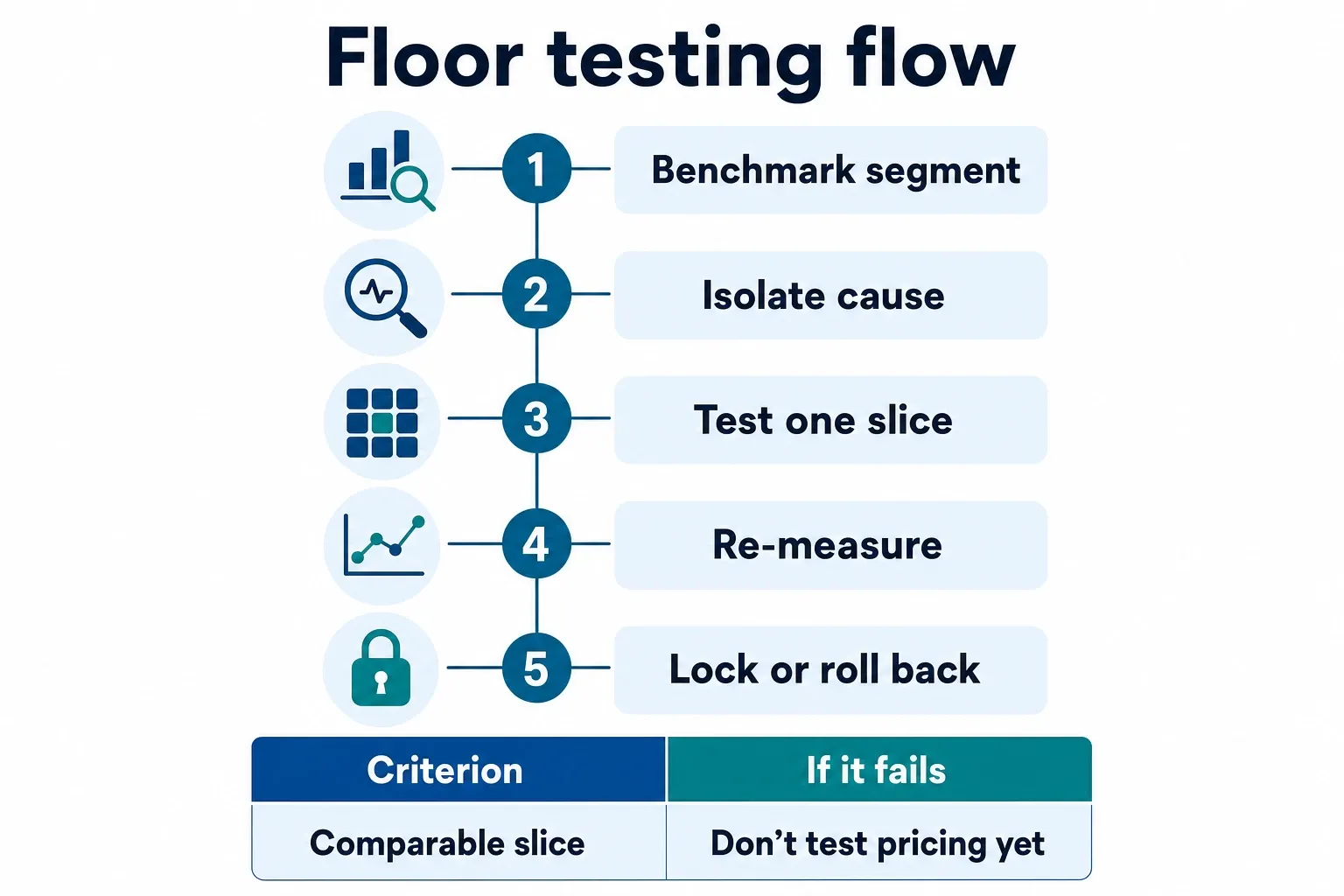
| Diagnostic stage | Named criterion | What to check | Action if it fails | Evidence anchor |
|---|---|---|---|---|
| 1. Segment benchmark | Comparable inventory | Same ad unit, device, geo, and demand source over a clean comparison window | Do not test pricing yet; rebuild the report until the segment is specific enough | Fill-rate visibility depends on a defined period and a clear denominator, similar to operational fill-rate tracking in Oracle NetSuite |
| 2. Cause isolation | Eligible demand | GAM targeting, exclusions, line-item priority, AdX eligibility, wrapper partner participation, and blocked categories | Fix eligibility or demand access before touching floors | Targeting and network quality are direct ad fill levers in Blockthrough |
| 3. Latency check | Auction completion | Bidder timeout, slow adapters, lazy-load trigger, page speed, and Core Web Vitals issues on the affected template | Tune timeout or remove slow demand from that placement before cutting price | Page load time is one of Blockthrough’s named ad fill optimization areas Blockthrough |
| 4. Controlled floor test | Price sensitivity | Current floor versus a lower or restructured test floor for one ad unit or geo bucket | Run a limited test; avoid network-wide floor changes | No external benchmark replaces your own segment-level auction data |
| 5. Revenue decision | Yield protection | Fill movement, eCPM change, revenue per session or page, and unfilled impressions | Keep, roll back, or expand only if total revenue improves without unacceptable UX cost | Ad fill is an auction outcome, so the winning metric must include price and volume together |
A clean test does not have to be complex. Choose one segment with enough volume to read, such as U.S. mobile web mid-article display, and leave nearby segments alone. If the current floor is suppressing demand, the lower test floor should increase served impressions. The real question is whether those extra impressions add enough revenue to offset any eCPM drop.
Keep weekday, weekend, and daypart behavior out of the noise as much as you can. A test that runs only on a Friday afternoon can fool you, especially if direct campaigns, homepage spikes, or newsletter sends change the traffic mix. Use the same reporting dimensions before and after, and note any unrelated wrapper, consent, or GAM rule changes during the window.
The fill rate vs. eCPM tradeoff: when lower fill is still the right answer
Lower fill can be the right answer when the unfilled impressions are low-value opportunities that would dilute eCPM, slow the page, or create weak ad experiences without lifting total revenue. Use revenue per session or page as the decision metric, with eCPM and fill as support. Fill alone rewards volume, even when the extra volume is not worth selling.
Use a page-level revenue view, not an ad-slot reflex
A single ad unit can look worse after a floor increase while the page performs better. A below-article unit, for example, may lose marginal fill when you raise its floor. But if total page ad revenue holds and fewer unfilled calls reduce latency, the move can still make sense. The reverse happens too: fill rises after a floor cut, but total page revenue falls because higher-paying auctions clear at lower prices.
This is where revenue per session keeps teams honest. It captures the combined effect of price, volume, and user behavior better than a slot-only fill report. If you use refresh, split initial-load impressions from refresh impressions. Refresh inventory can distort fill and eCPM because it does not auction under the same conditions as the first pageview.
Know when chasing fill creates a worse stack
Chasing fill can backfire when it hides demand-path problems. If a low-quality path fills impressions that stronger buyers avoid, top-line fill improves while buyer trust, creative quality, and SPO positioning get worse. That matters for publishers with meaningful AdX and header bidding volume, because buyers can choose cleaner paths to reach the same inventory.
It can create product problems too. Extra low-yield ads can increase layout instability, add requests, and make Core Web Vitals fixes harder. If a slot earns very little and hurts the template, the better move may be to remove it, lazy-load it later, or make it eligible only when demand conditions are stronger.
Document the decision so the next report does not undo it
Every floor decision should leave a short trail: segment tested, old rule, new rule, dates, affected demand sources, fill movement, eCPM movement, revenue per session or page, and the final call. Put the note where ad ops, yield, and sales can find it. Otherwise a future weekly report will flag low fill, and someone may reverse a profitable constraint because the context disappeared.
For your own stack, the remaining calls are specific. Decide which segments deserve their own benchmark based on volume and revenue concentration. Decide how much eCPM risk you’ll accept based on revenue per session, not pressure to fill every request. Decide which demand paths stay in the wrapper based on incremental revenue, latency cost, and buyer quality. That is fill rate optimization with yield discipline.
Frequently asked questions
What is a good fill rate for publishers?
There isn’t a universal benchmark. A good fill rate is the one that fits the ad unit, geo, device, and demand source while still maximizing total revenue, not just the percentage itself. A sitewide target is usually too blunt for mid-to-large publishers; a U.S. mobile mid-article unit should not be judged against an international right rail.
Why is my fill rate low even though demand is strong?
Usually because something in the path is narrowing eligibility: floors, targeting conflicts, bidder timeouts, or latency that keeps requests from clearing in time. In header bidding stacks, that can also include Supply Path Optimization pressure, bidder-specific floors, or duplicate demand paths that look healthy on paper but don’t actually clear inventory.
Should I lower floors to increase fill rate?
Only after you segment the problem. A blanket floor cut can recover inventory, but it can also give away revenue if the real issue is targeting, exclusions, or latency. If the weak segment is a low-viewability mobile below-article placement, lowering floors may help; if the issue is a misconfigured rule in GAM, it won’t.
How do I know whether fill or eCPM should be the priority?
Compare revenue per page, revenue per session, and segment-level yield. If a lower fill rate produces more total revenue, fill is the wrong primary KPI for that segment. The right call is usually the one that improves total monetization without introducing avoidable latency or a bad user experience.
How we researched this
Sources consulted for this article:
- NetSuite Applications Suite - Optimizing Fill Rate
- How to Achieve Superior Fill Rate Optimization in Liquidity
- Fill Rate - CubeworkFreight & Logistics Glossary - Item.com
- How do you optimize and increase your ad fill rate? - Blockthrough
- Fill Rate: Definition and maximizing efficiency in inventory management | WarehouseQuote
- Enhancing Fill Rate Visibility in SAP S/4HANA - Cognitus Consulting