

Lazy Loading Ads: Improving Core Web Vitals Without Losing Revenue
Lazy loading ads should delay fetch and render for lower-priority placements until they are close enough to the viewport to load before the user arrives. Done well, it reduces startup work and protects Core Web Vitals. Done bluntly, it creates blank slots, weaker auctions, and slot-level RPM loss.
Key takeaways
- Lazy loading works best when you tune by placement priority, not with one blanket rule for every slot.
- The real tradeoff is timing: load early enough for auction quality, but late enough to reduce startup cost.
- Viewability can look better after lazy loading even when demand quality or revenue weakens, so check fill and RPM too.
- GAM and GPT settings should match the page template and scroll behavior, not just the ad unit label.
- After launch, watch latency, unfilled impressions, and refresh behavior by slot before you trust the Core Web Vitals win.
A practical way to judge the tradeoff: load sooner, view sooner, or score better
Key takeaways: • Do not lazy load the top monetized slot by default. • Start with below-the-fold and deep-scroll inventory. • Separate fetch timing from render timing. • Validate by ad unit, device, and template in Google Ad Manager, not only by page-level RPM. • Treat better viewability with lower revenue as a warning, not a win.
| Ad placement type | Usual lazy-load stance | Core Web Vitals impact | Viewability risk | Auction and revenue sensitivity | Practical call |
|---|---|---|---|---|---|
| Top leaderboard, hero, or first visible display slot | Usually exempt or very conservative | Low to moderate, because it is already on the critical path | High if render is delayed after the user sees the slot area | High for AdX, direct-sold, and header bidding competition | Keep eager unless the unit is below the first viewport on a specific template. Lazy loading is meant to defer non-critical resources, not delay primary inventory, as described by Aditude. |
| Sticky anchor or sticky sidebar | Conservative | Moderate if the script work competes with page startup | Medium; sticky behavior can make the slot viewable quickly once enabled | High because refresh and viewability timing often depend on stable delivery | Fetch early enough that the sticky slot is ready before it becomes eligible for display. Do not let lazy loading fight your refresh rules. |
| First in-feed unit | Conservative by device and template | Moderate, especially on article pages with heavy creative and content modules | High on fast-scroll mobile sessions | High; late auctions can reduce bid density before the user passes the slot | Use a tighter fetch window than deeper feed units. This is where performance goals and monetization pressure usually collide. |
| Mid-article display or native unit | Moderate lazy loading | High enough to help because it removes non-critical work from initial load | Medium; users often reach it, but not immediately | Medium; auction latency matters but there is more runway | A good default candidate. AdButler frames lazy loading as loading resources only when needed, which fits mid-page inventory well AdButler. |
| Below-comments, footer, or deep sidebar unit | Aggressive deferral | High, because the unit should not compete with startup rendering | Low to medium; the placement may never be reached | Low to medium unless packaged in a guarantee | Delay hard. Loading these at page start creates cost without reliable viewable opportunity. |
| Infinite scroll next-page slots | Aggressive, with controlled prefetch | High on long sessions because each appended page can otherwise stack network and render work | Medium; too-late fetches create blank slots during rapid scroll | Medium; SSP and header bidding latency can show up suddenly | Trigger before the new content block enters view, not after. Refinery89 describes lazy loading as waiting for the browser viewport to approach the resource Refinery89. |
| Sponsorships, roadblocks, and high-priority direct campaigns | Usually exempt | Variable; the performance cost may be worth the contractual value | Very high if late delivery affects impression goals or share of voice | Very high because pacing and guarantees matter more than marginal score gains | Exclude unless the placement is clearly below the fold and the campaign terms allow delayed delivery. Validate in Google Ad Manager before rollout. |
Why lazy loading ads matters for page speed and Core Web Vitals
Use lazy loading to keep below-the-fold ad calls, bidder work, creative downloads, and rendering out of the initial load path. Avoid firing every deferred auction on the first scroll. The proof is field data: p75 LCP, CLS, and INP should improve or hold steady while ad-unit fill, unfilled impressions, and RPM stay within your rollout guardrails.
For Core Web Vitals, the upside is specific. LCP can improve when GPT, header bidding, SSP calls, measurement code, and creative execution stop competing with the main content during startup. CLS improves only if the ad container already reserves space with a fixed height, min-height, or responsive placeholder before the creative renders. INP can benefit when early ad work no longer crowds the main thread.
Where the performance win stops
Do not judge lazy loading from a clean lab run alone. A synthetic test may look better because deep ad slots no longer load at page start, while real users still feel a scroll jank spike when multiple auctions and creatives fire together. Check field RUM or CrUX-style percentile data, then tie it back to ad-slot events.
Lazy loading ads works best as sequencing, not as a blanket speed switch. Ads Interactive describes the core performance idea as avoiding early downloads for resources that are not needed yet, but publishers have another constraint layered on top: the ad still has to arrive before the user gets to the slot Ads Interactive.
Set the trigger too close to the viewport and you create blank slots, shorter bidder windows, and refresh timing changes. Set it too far away and the page still pays most of the startup cost. A workable test range is usually looser for the first below-the-fold unit and tighter for deep article, gallery, or infinite-scroll inventory.
How lazy loading affects viewability measurement
Lazy loading changes viewability reporting because request, render, and viewable time move closer together. Validate the change with viewable impressions, measured impressions, total ad server impressions, fill, and revenue by placement. Avoid calling a higher viewability rate a success until the denominator and RPM still make sense under Google Active View reporting.
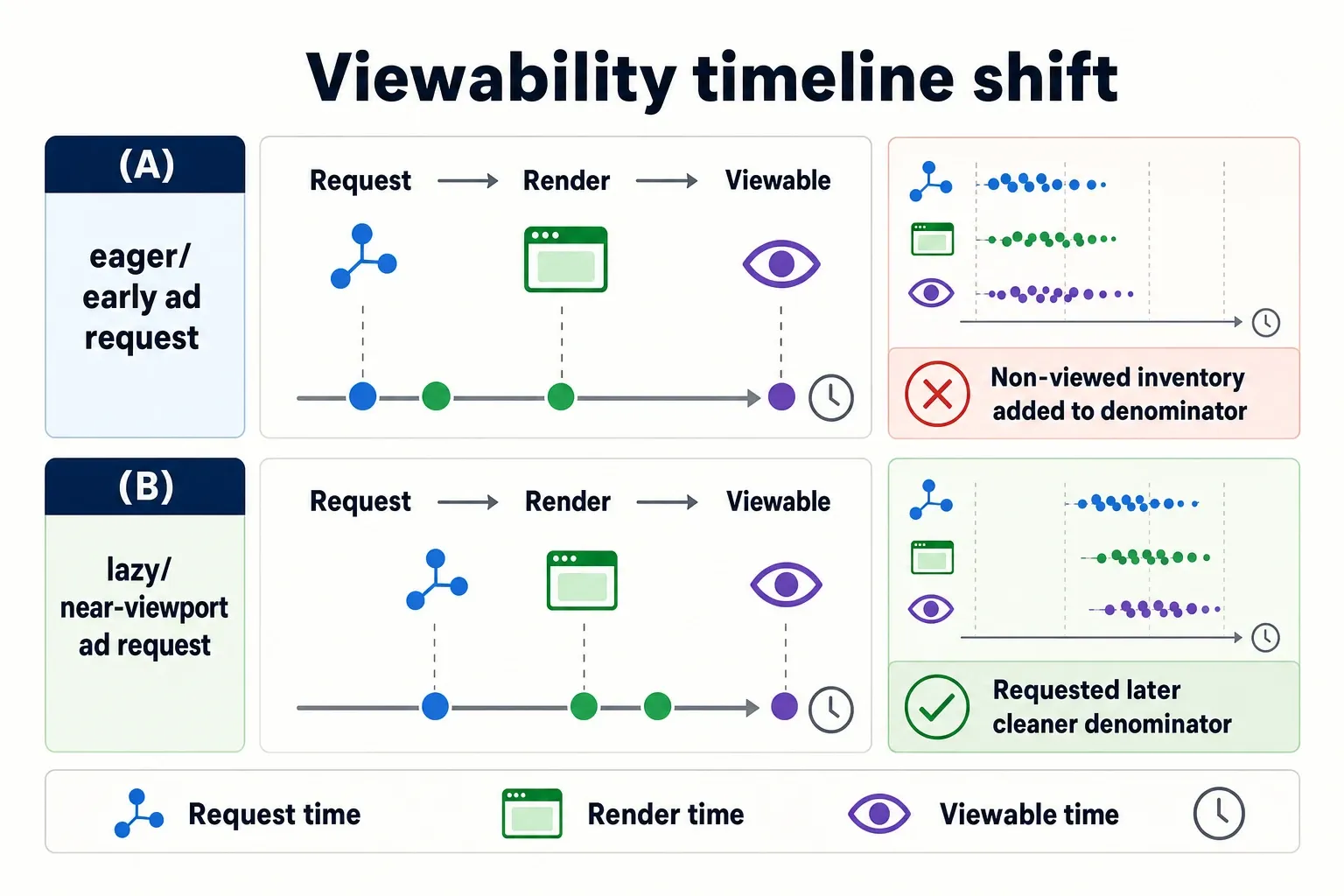
Requesting an ad later does not guarantee the user sees it later. A mid-article unit may fetch near the viewport, render quickly, and become viewable almost immediately. A unit at the same scroll depth can still lose the user if consent checks, bidder timeout, creative weight, or the wrapper queue delays render.
The reporting drift to watch
MRC-style viewability can tell a different story after lazy loading because non-requested deep inventory may never enter the measured pool. For display, the common baseline is whether enough pixels are in view for the required time, but the denominator matters just as much as the numerator. Use MRC viewability guidance or Google Active View metrics alongside total impressions and revenue.
Refresh logic can drift even when the refresh code does not change. If a sticky unit loads later, its first eligible refresh can move later too. If the rule depends on viewability, time in view, active-tab state, or user interaction, lazy loading can reduce or shift refresh volume by placement.
Prebid timing creates a separate failure mode. A slot that previously auctioned during page load may now auction while the user is scrolling. If your configured bidder timeout, consent flow, ID sync, or creative render path competes with scroll handling, the page can feel worse even while the viewability percentage improves.
Read the results as a placement-level tradeoff. If viewability rises but fill, bid density, or ad-unit RPM falls, you likely improved measurement quality more than monetization. Use a pre-set guardrail, such as reviewing or rolling back any placement where 7-day slot RPM drops more than 5% versus its control and Core Web Vitals do not materially improve.
Configuring lazy load thresholds in GAM and GPT
Configure lazy loading in Google Publisher Tag by separating the fetch margin from the render margin, then confirm delivery in Google Ad Manager reports by ad unit, device, and template. GPT exposes lazy-load controls such as fetchMarginPercent, renderMarginPercent, and mobileScaling in its lazy loading API Google Publisher Tag lazy loading. Validate impressions, unfilled impressions, and Active View metrics in Google Ad Manager reporting.
- Map your slots by template before changing GPT. Separate top-of-page, sticky, first in-feed, mid-content, deep-content, and appended infinite-scroll inventory. Use real page templates, not ad unit names alone, because the same ad unit can sit above the fold on desktop and below the fold on mobile.
- Set a fetch window that gives demand enough runway. In GPT lazy loading, publishers typically define how far from the viewport a slot can be before the ad request is triggered. The fetch window should account for header bidding latency, AdX competition, consent flow, identity modules, and creative load time.
- Set a render window separately. Fetching earlier and rendering later can protect demand while still reducing early rendering work. If render happens too late, the slot may be technically filled but visually blank when the user arrives.
- Coordinate GPT with Google Ad Manager and your header bidding wrapper. The wrapper should not start auctions so late that bidders time out, and GAM should not receive requests in a pattern that breaks line-item expectations. Cool.co’s SSP-focused guide describes the core goal as serving ads when users are likely to view them, but that still requires enough time for the supply path to respond Cool.co SSP guide.
- Create slot-specific exceptions. Exempt or soften lazy loading for sponsorships, roadblocks, sticky units, first in-feed placements, and any ad unit with direct-sold pressure. Do not let a global threshold override inventory that sales or yield teams actively manage.
- Tune by device behavior. Mobile users can move through the first screen quickly, and infinite-scroll pages can create sudden demand bursts. Desktop sidebars have different exposure patterns. Use separate thresholds when scroll depth and slot density differ materially.
- Check the browser behavior, not just the config file. Use dev tools, GPT event logging, and ad server timing to confirm the slot fetches before it enters view and renders without layout movement. A correct-looking setting can still be wrong if another script delays execution.
Balancing lazy loading with above-the-fold demand
Use placement tiers instead of one global threshold. Exclude the primary above-the-fold unit unless you have a separate test. For the first below-the-fold slot, test a looser fetch window such as 300% to 600% of the viewport and render around 100% to 200%. For deeper article or gallery units, test tighter windows such as 200% to 400% fetch and 50% to 150% render. On mobile, use GPT mobile scaling carefully because a fast thumb-scroll can cross several slots before auctions finish.
- Keep hero and first visible units out of aggressive lazy loading. If a top leaderboard or first in-feed unit is visible within the initial viewport, late fetches can reduce competition before the user has even started reading.
- Treat sticky units as timing-sensitive inventory. A sticky placement can become viewable quickly and may be tied to refresh rules. Load it early enough to avoid a blank sticky container or a delayed first impression.
- Exempt sponsorships and direct-sold campaigns unless the contract and placement behavior support deferral. A roadblock that arrives after the user scrolls past the first screen can create makegood pressure that no Core Web Vitals gain will justify.
- Watch bid density on fast-scroll sessions. Overly tight thresholds can mean fewer SSPs and bidders have time to respond before the ad opportunity disappears, especially on mobile article pages and feeds.
- Reserve space for every lazy-loaded slot. CLS problems often come from containers that collapse or expand when the ad arrives. The fix is not only delayed loading; it is predictable layout.
- Use deeper inventory for aggressive savings. Footer units, below-comments placements, and low-reach sidebars are better candidates because the page should not spend startup resources on impressions that may never be seen.
- Separate AdX behavior from wrapper behavior in analysis. If AdX fill looks stable but header bidding demand thins out after rollout, the threshold may be giving Google demand enough time while starving slower partners.
Testing and monitoring after implementation
A lazy loading rollout works only if Core Web Vitals improve without hurting delivery or yield. Baseline at least one normal traffic cycle, then ship by template and placement tier: control, small traffic slice, larger slice, full rollout.
Track p75 LCP, CLS, INP, ad-unit RPM, fill, unfilled impressions, bid response timing, blank-slot events, and refresh count.
Interpret conflicts directly: better LCP with lower first in-feed RPM means the threshold is too tight for that slot; higher viewability with more unfilled impressions means the denominator changed; stable revenue with worse INP means auctions are bunching on scroll.
- Take a pre-launch baseline by template and placement. Capture LCP, CLS, INP, viewability, fill rate, RPM, ad request count, unfilled impressions, auction latency, and render timing. Sitewide averages are too blunt for this change.
- Roll out in stages. Start with one template, one property, or one group of below-the-fold units. Do not flip a network-wide setting across multiple properties with different layouts and scroll behavior.
- Compare field data to ad data on the same time window. Core Web Vitals field data, GAM delivery, AdX performance, wrapper analytics, and SSP reporting will not line up perfectly by default. Use consistent date ranges and avoid mixing a weekday baseline with a weekend test.
- Look for thresholds that are too tight. Warning signs include blank slots during scroll, lower fill on mid-article units, more unfilled impressions, thinner header bidding participation, and viewable impressions occurring later than expected.
- Look for thresholds that are too loose. Warning signs include weak LCP improvement, continued main-thread congestion near load, heavy early network activity, and no meaningful reduction in requests for deep placements.
- Adjust fetch before render in most revenue-sensitive cases. If demand is being starved, widen the fetch margin first. If performance is still weak but fill is stable, tighten render timing or apply aggressive loading only to deeper slots.
- Monitor first-scroll behavior. A page can pass a synthetic test and still feel rough when the first scroll triggers several auctions, creative renders, and measurement calls at once.
- Keep a rollback path. Store the previous GPT settings, wrapper configuration, and GAM targeting assumptions so you can revert a template quickly if a premium placement underdelivers.
Launch checklist
Ship order for lazy loading ads: 1) map inventory by template, device, slot position, refresh behavior, and direct-sold obligations; 2) exclude hero units, sponsorships, takeovers, roadblocks, and any placement with strict delivery pacing until separately approved; 3) align GPT lazy-load margins with wrapper auction timing so Prebid or Amazon demand is requested before GPT render; 4) add QA events for slot requested, auction started, auction ended, GPT render ended, impression viewable, blank slot, and refresh; 5) roll out by placement tier, starting with deep below-the-fold units; 6) rollback by placement if blank slots rise, unfilled impressions spike, ad-unit RPM drops beyond the agreed guardrail, or p75 LCP/INP does not improve enough to justify the yield loss.
- Identify every slot that should be exempt: hero, first visible, sticky, sponsorship, roadblock, and other high-priority direct-sold inventory.
- Set separate fetch and render behavior for top, mid-page, deep-page, and infinite-scroll placements.
- Confirm GPT lazy loading does not start header bidding auctions too late for AdX and SSP competition.
- Reserve fixed space for lazy-loaded units so CLS does not come back through collapsing containers.
- Review LCP, CLS, and INP alongside viewability, fill, RPM, latency, and unfilled impressions.
- Segment results by template, device, and ad unit instead of trusting sitewide averages.
- Check whether viewability improved because users saw better ads or because low-probability impressions stopped entering measurement.
- Tune thresholds after launch using scroll depth and render timing, not guesswork.
- Keep premium above-the-fold demand fast, predictable, and fully eligible for competition.
Frequently asked questions
Does lazy loading ads improve Core Web Vitals?
FAQ: Do lazy loading ads improve Core Web Vitals? Usually yes, if below-the-fold ad work stays out of the initial load path and every ad container reserves space before render. It can help LCP, reduce CLS risk, and ease main-thread pressure that affects INP. The gain disappears if auctions, render, and measurement all bunch up on scroll.
Can lazy loading hurt ad viewability?
FAQ: Can lazy loading ads hurt revenue? Yes, if the trigger fires too late and the user reaches the slot before the ad has time to fetch, auction, and render. That risk is highest on fast-scrolling pages, shallow thresholds, and demand paths with slower bidder or creative response. Fix the placement threshold before abandoning lazy loading.
Should above-the-fold ads be lazy loaded?
FAQ: Should above-the-fold ads be lazy loaded? Usually no for the primary hero or topmost monetized slot. Those placements need enough time for demand, auctions, and creative rendering to complete before the first impression opportunity. Test tighter lazy loading on below-the-fold units first, where the performance upside is larger and the revenue risk is easier to contain.
What should I monitor after turning on lazy loading?
FAQ: What metrics prove lazy loading worked? Track Core Web Vitals beside delivery and yield metrics. LCP, CLS, and INP show whether the page got lighter; Active View, ad-unit RPM, fill rate, bid response timing, unfilled impressions, and refresh count show whether monetization held. Use Google Ad Manager reporting and Google Active View at the slot level, not only at the site level.
Is GPT enough for lazy loading or do I need additional logic?
FAQ: Is GPT lazy loading enough by itself? GPT can handle fetch and render margins, but it usually does not cover the whole operating policy. You still need page-level logic for slot-specific thresholds, wrapper coordination, sponsorship exclusions, infinite scroll, refresh rules, and rollback. Check the browser event sequence in QA: slot request, auction start, auction end, GPT render, viewable impression, and refresh should fire in the order you expect.
How we researched this
Sources consulted for this article:
- Lazy loading ads - AdButler
- Lazy loading in programmatic advertising: when being lazy is good
- Should I Implement Lazy Loading Ads? | Supply-Side Platform
- What is Lazy Loading? - Ads Interactive Blog
- Ad refresh and lazyloading strategies — for publishers and networks
- 5 Reasons Why Publishers Should Use Lazy Loading - Aditude