

Ad Refresh Best Practices: How to Boost Revenue Without Hurting UX
Ad refresh means reloading an ad slot while the user is still in the same page session. The setups that actually add incremental US$ do it only when the refreshed impression is viewable, clearly declared, measured at the session level, and tuned by placement instead of forced through one blanket sitewide timer.
Key takeaways
- Refresh helps only when the slot is truly viewable and the extra impression has real auction value.
- Use event-based triggers on dynamic placements and timers only where exposure is predictable.
- Tie refresh logic to MRC viewability, not just elapsed time on page.
- Set intervals by ad unit, then validate RPM, viewability, and session depth together.
- Poor refresh setups can raise impression counts while quietly lowering demand quality.
What ad refresh is, and where it actually earns you money
Ad refresh gives you more sellable impressions from the same visit. It only helps, though, if those extra auctions don’t drag down viewability, CPM, latency, or session depth. Treat it as a same-session inventory multiplier, not a way to paper over weak demand.
Operationally, you refresh one specific ad unit after a trigger fires. The user stays on the page. The content doesn’t have to reload. The auction runs again, usually through Google Ad Manager, Google AdX, header bidding demand, or a managed yield stack.
Digital Content Next gets the upside right: refresh can lift revenue per session when it’s used without hurting user experience or ad viewability. That “if” carries the whole business case. Low-quality refreshed impressions can teach buyers to bid less for the same inventory over time Digital Content Next.
Slot refresh is not the same as page refresh
Refreshing one slot gives you much cleaner control. You can require that unit to be in view, enforce a minimum interval, check whether the tab is active, and then refresh only that ad unit.
Refreshing an entire page, or even a group of slots, is much harder to justify. A top leaderboard, a mid-article unit, and a below-the-fold rail unit don’t have the same exposure pattern. Refresh them together and reporting may show more impressions while masking which slot drove revenue and which one weakened the auction.
Feed and gallery refresh need separate treatment
A feed placement doesn’t behave like a static article slot. A native ad between cards may refresh based on scroll behavior or content movement, while a gallery unit may refresh after the user advances to the next image.
Aditude describes the core benefit as creating more impressions from one session without making the user reload the page or click somewhere else. That’s also the limit. Refresh should follow real attention, not create impressions the user never had a fair chance to see Aditude.
Time-based vs. event-based refresh triggers: which one belongs on which placement
Fixed timers are the easiest to run. Event-based triggers usually create cleaner inventory, especially on placements where attention changes with scrolling, tab focus, or content interaction. Match the trigger to the placement’s exposure pattern, not to whatever wrapper setting is most convenient.
| Trigger type | Best-fit placements | How it works | Main failure mode | Evidence anchor |
|---|---|---|---|---|
| Fixed interval | Sticky units, high-viewability rails, long-read article slots | Refresh fires after a minimum elapsed time, often with an added in-view requirement. | Aggressive timers create impressions that buyers discount, especially if the slot is not actually visible. | Clickio notes that Google recommends at least 30 seconds for web refresh setups Clickio. |
| In-view time | Article body units and sticky units | Timer only counts while the ad slot is viewable, then pauses when it leaves view. | Bad viewport logic can refresh after the slot has fallen out of view. | MRC viewability rules make pre-refresh visibility the gating condition, not a post-refresh cleanup step MRC. |
| Scroll depth or feed movement | Infinite scroll, homepage feeds, recirculation modules | Refresh is tied to user movement through content, such as passing a feed card or reaching a new content segment. | Noisy scroll events can fire too often unless debounced and scoped to the specific slot. | Publisher Collective calls out correct event listener implementation as a core best practice Publisher Collective. |
| Tab focus or page visibility | Desktop article pages, utility pages, long sessions | Refresh is blocked while the browser tab is inactive and allowed only after focus returns and visibility checks pass. | Duplicate listeners can trigger multiple refresh calls when the user returns to the tab. | Google Ad Manager requires refresh behavior to be declared correctly for eligible inventory Google Ad Manager. |
| Content interaction | Galleries, slideshows, interactive pages | Refresh follows a meaningful action, such as moving to another gallery item or expanding content. | Refreshing on superficial clicks can look like impression inflation rather than audience exposure. | Publisher Collective warns publishers to limit listening events and avoid logging sensitive data Publisher Collective. |
MRC viewability standards you have to respect before you refresh
A refreshed display impression should qualify only after the slot meets the practical viewability threshold: at least 50% of pixels in view for one continuous second for standard display, with large display and video handled separately. Build the refresh gate around that exposure, not page time alone.
MRC guidance matters in a refresh setup because the first impression and the refreshed impression are separate monetization events. If the first ad never had a real viewable opportunity, refreshing that same slot doesn’t solve the quality issue. It makes it worse.
Translate viewability into implementation checks
The slot should pass the visibility check before the refresh call fires. Your logic needs to know whether the ad unit is in the viewport, how much of it is visible, whether the tab is active, and whether the minimum elapsed time was counted only during eligible exposure.
Don’t use “the user has been on the page for 60 seconds” as a stand-in for attention. A reader may have scrolled past the unit after 12 seconds, switched tabs, or left the page open while doing something else. A timer that keeps running through those states creates inventory that looks available in reports but weak in the auction.
Policy risk starts with artificial inflation
Google Publisher Policies prohibit invalid activity, and Google AdX buyers expect inventory that is declared and measurable. If your refresh logic creates impressions with no realistic chance of being seen, you’re no longer dealing with only lower CPM. You’re dealing with quality and compliance risk Google Publisher Policies.
The safest operating rule is straightforward: a slot earns the right to refresh only after it has delivered a qualifying exposure window. Then the refreshed creative needs its own real chance to be seen. Anything looser turns viewability reporting into a lagging indicator instead of a control.
How to set safe refresh intervals by ad unit
Safe intervals should start conservative, then move down only after viewability, CPM, and session revenue show the inventory can support more auctions. One universal timer usually misprices attention because sticky, article, feed, and below-the-fold units age differently during a session.
- Start above the minimum, not at the floor. Mile Technologies recommends starting with a high refresh rate and reducing it gradually; its example is 90 seconds. That is a useful first test for article body inventory because it lets you see whether refreshed demand clears without immediately stressing viewability Mile Technologies.
- Separate high-engagement units from passive units. A sticky footer or sticky rail can justify a shorter test window than a mid-article slot because it stays exposed longer, but it also carries higher UX risk. Treat it as premium screen real estate, not an unlimited impression machine.
- Use below-the-fold inventory only after the user creates exposure. A unit that starts outside the viewport should not inherit a timer that began at page load. Start counting after the slot becomes viewable, or you will refresh inventory before the reader reaches it.
- Split mobile and desktop tests. Mobile pages have faster scroll behavior, smaller screens, and more accidental obstruction from browser UI or sticky elements. Desktop sessions may support longer dwell, but inactive tabs are more common. Use separate line items, key-values, or experiment labels so the data does not blur.
- Lower intervals one placement at a time. If you change sticky, article body, and feed refresh in the same release, you will not know which unit caused a viewability drop or CPM compression. Move one lever, let it collect enough comparable traffic, then decide whether to keep moving.
Common mistakes that trigger policy violations or weak performance
Most refresh problems come from bad eligibility logic, not from refresh as a concept. The pattern is familiar: the setup creates more ad calls than the user’s attention can support, then impression growth gets celebrated while the quality metrics start slipping.
- Refreshing with missing or duplicate event listeners. A scroll listener attached twice can call refresh twice; a listener that never detaches can keep firing after a slot is removed from the DOM. Publisher Collective specifically flags correct listener implementation as a best practice because this is where clean logic often breaks.
- Using sensitive or noisy event tracking. You do not need to log granular user behavior to decide whether a slot is eligible. Keep listening events limited to ad-serving conditions such as visibility, focus, scroll threshold, and content interaction, and avoid collecting signals that create privacy or data hygiene exposure.
- Refreshing every few seconds. Refinery89 gives the blunt example: do not make ads refresh every 5 seconds, because users dislike it and advertisers do not want placements that cannot be properly viewed Refinery89.
- Applying refresh to weak demand without fixing the ad unit. If a placement has poor viewability, low bid density, lazy loading problems, or layout instability, refresh will multiply the defect. Fix the unit first, then test whether extra auctions add clean revenue.
- Ignoring creative and page performance. A refresh that increases script work, layout shifts, or ad render delay can shorten the session that was supposed to generate extra revenue. Watch the ad slot’s behavior in the browser, not only the GAM report.
- Failing to declare refresh behavior. Google Ad Manager’s refresh controls exist so buyers understand the inventory they are bidding on. If the setup is not declared or segmented correctly, you are mixing refreshed and non-refreshed impressions in a way that makes pricing and trust harder to defend.
How to measure whether refresh is actually helping RPM
Refresh is working only if session-level revenue improves without unacceptable losses in viewability, CPM, engagement, or ad quality. Impression count is the weakest success metric on its own. Any aggressive configuration can manufacture more ad calls.
Build the test around net RPM and revenue per session. At minimum, compare ad revenue per 1,000 sessions, page RPM, ad request RPM, viewability, fill, CPM, session duration, pages per session, and unfilled impressions. Keep US$ revenue in the same reporting window, and don’t mix direct-sold campaigns with open auction effects unless that’s part of the test design.
Use controlled rollouts, not sitewide switches
Run A/B tests or controlled rollouts by property, template, device class, and placement. If you’re a mid-to-large publisher with multiple properties, don’t enable refresh across the whole network just because one article-template test looked promising.
Google Ad Manager key-values are useful for this because you can label refresh eligibility, interval group, trigger type, and placement type. That lets you compare Google AdX and header bidding outcomes against the same inventory slice instead of reading too much into blended reports.
Look for auction price compression
The failure case can be easy to miss: total revenue goes up because impressions go up, but CPM drops, viewability drops, and users consume fewer pages. Gross lift can hide a weaker session if you’re not measuring the tradeoff.
Use a holdout group with no refresh, then compare revenue per session and page depth before you scale. Publisher Collective recommends A/B testing refresh setups, and that advice matters most when the first readout looks positive while demand quality signals are moving the wrong way Publisher Collective.
A practical refresh tuning matrix for common placements
The strongest refresh setup is specific to the placement: conservative for article body units, stricter for sticky UX, behavior-led for feeds, and interaction-led for galleries. Use the matrix as a starting point, then tune against your own GAM, AdX, and wrapper data.
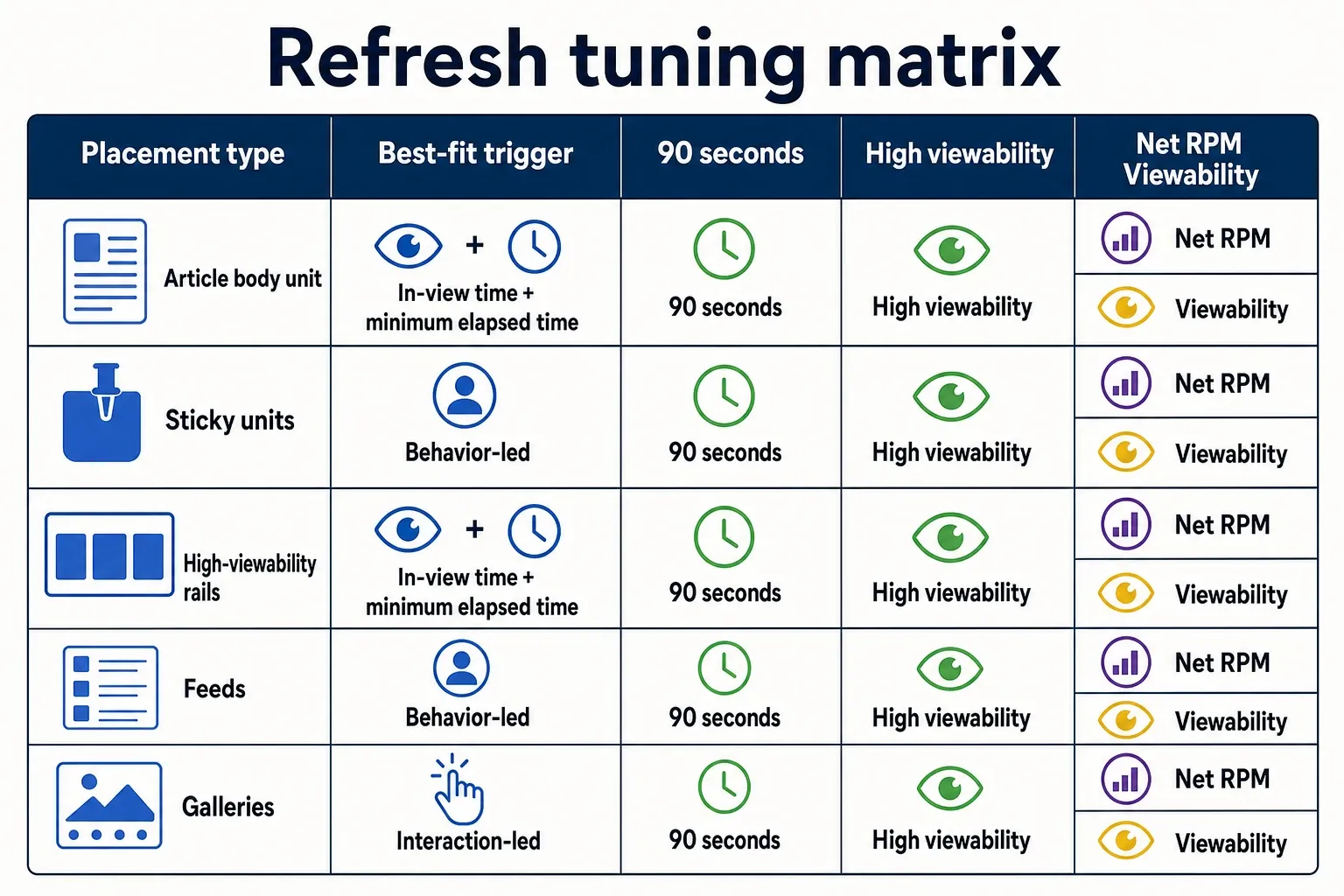
| Placement type | Best-fit trigger | Conservative starting interval | Viewability sensitivity | UX or policy risk | Measurement priority |
|---|---|---|---|---|---|
| Article body unit | In-view time plus minimum elapsed time | 90 seconds for the first test; reduce only if CPM and viewability hold | High, because the reader may scroll past the slot quickly | Medium: poor logic refreshes a unit the reader already left | Compare revenue per session, slot viewability, and CPM; Mile Technologies supports starting high and stepping down Mile Technologies. |
| Sticky footer or sticky rail | Fixed interval gated by viewport and tab focus | 60 seconds, with extra caution on mobile | Very high, because the unit is persistently exposed | High: clutter, accidental taps, and user annoyance can offset revenue | Track session depth, close interactions if available, Core Web Vitals impact, and refreshed CPM; Clickio cites Google’s 30-second-or-more recommendation as a lower boundary, not a target Clickio. |
| Feed or native placement | Scroll depth, feed movement, or card exposure | After the ad card has had a qualifying in-view window, not from page load | Variable, because exposure depends on scroll speed | Medium: noisy scroll events can overcount eligibility | Measure feed engagement, viewability by card position, and revenue per 1,000 feed sessions; Aditude specifically notes native refresh in content feeds based on user behavior Aditude. |
| Gallery or slideshow unit | User action tied to meaningful content change | After a slide change plus a minimum exposure gate | High, because repeated interactions can tempt over-refreshing | High: superficial clicks should not become ad-call triggers | Separate gallery pageviews, slide depth, ad viewability, and session revenue; Digital Content Next ties proper refresh to session revenue without compromising viewability Digital Content Next. |
Use this checklist before taking a refresh test beyond one template or one property:
- Confirm every refreshed slot is declared correctly in Google Ad Manager and segmented from non-refreshed inventory.
- Require pre-refresh viewability, active tab status, and a minimum elapsed exposure window before the ad call.
- Set intervals by placement type: article body, sticky, feed, and gallery should not share one timer.
- Keep event listeners scoped, debounced, and free of sensitive behavioral logging.
- Compare test and holdout groups on revenue per session, RPM, CPM, viewability, fill, unfilled impressions, and session depth.
- Check mobile and desktop separately before making a network-level decision.
- Stop any setup where extra impressions are accompanied by weaker viewability, lower auction pricing, or shorter sessions.
Frequently asked questions
What is the safest ad refresh interval?
There isn’t a single safe number for every placement, but the conservative starting point most vendors reference is 30 seconds or more on web. The safer interval is the longest one your slot can tolerate while still generating incremental revenue, because a tighter timer can dilute auction quality and ad viewability. In practice, set it by placement instead of forcing one sitewide cadence.
Do refreshed impressions have to be viewable?
Yes, if you want the setup to hold up under scrutiny. The refreshed impression should only fire after the slot has a real viewable opportunity, not just because the page clock kept running. That means gating refresh on actual in-view exposure and the rules you’re following, especially for Google AdX and publisher policy compliance.
Should I use time-based or scroll-based refresh?
Use the trigger that matches the slot’s exposure pattern. Time-based refresh is easier for stable placements, but scroll-based or other event-driven triggers usually make more sense for units whose attention changes with user behavior, like feed placements or content-driven modules. The article’s point is simple: match the refresh logic to the placement, not to whichever wrapper setting is easiest.
Can ad refresh hurt CPM?
Yes. If you refresh too aggressively or before the ad is truly viewable, you can flood the auction with low-quality impressions and pressure CPM downward. The risk isn’t just lower short-term value; buyers may also learn that the inventory is weak, which can hurt bidding quality over time.
How do I know if refresh is worth it?
Test it at the session level and look at net RPM, not just raw impression growth. Refresh is worth keeping only if it raises revenue per session without dragging down viewability, latency, or user experience. If the lift comes from more impressions but the session quality gets worse, the setup is costing you more than it adds.
How we researched this
Sources consulted for this article:
- Ad Refresh – The Complete Guide for Publishers
- Ad Refresh Issues and Best Practices: What Goes Wrong and How...
- Understand what's Ad Refresh and how it works - Refinery89
- Considering Ad Refresh? Here's what you need to know - Digital Content Next
- Ad Refresh: Maximizing Revenue Without Disrupting User Experience - Aditude
- Ad Refresh: What It Is and How to Implement It Safely - Clickio