

Ad Density Optimization: Finding the Balance Between Revenue and UX
Ad density optimization means controlling how much visible page space ads take up, then adjusting that load by template, device, and placement so revenue improves without dragging down viewability, speed, or engagement. The real question is not "How many ads can we fit?" It's "Which ad exposure earns more than it costs?"
Key takeaways
- Ad density is about visible space, not slot count, so pixel-based audits beat simple ad tallies.
- A site can feel overloaded long before it breaks policy or loses revenue.
- The best test plan changes one layout variable at a time and watches both monetization and engagement signals.
- Stickies, repeated in-content units, and crowded above-the-fold stacks are usually the first places to cut.
- Audit density by template and device; sitewide averages hide the pages doing the real damage.
What ad density actually measures, and why the number alone is not enough
Ad density is the share of visible page space taken up by ads, which makes a pixel-based audit far more useful than a simple slot count. Four large units can feel heavier than seven smaller, better-spaced placements because users experience screen occupation, not line items in Google Ad Manager.
Databeat defines ad density as the percentage of visible space occupied by ads and points to a common 30% guideline, based on ad pixel area compared with total page area Databeat. Use that as a review threshold, not a universal target. A recipe page, a long-form article, and a category landing page can't carry the same visible ad load.
Use pixel area and placement, not slot count
Start the audit with the rendered viewport: what a real device shows after the page loads, sticky elements appear, and lazy loading begins to fire. Count the space taken by the leaderboard, rail, in-content units, sticky footer, video player, and any commerce widget that acts like an ad.
Browsi looks at ad density as the height of ads in the main content area divided by the total height of that content area, which is useful because it keeps your attention on the reading area, not just the full document Browsi. That matters on infinite-scroll news templates, where the page may be long but the reading column can still feel packed.
A modest slot count can still feel overloaded
Three placements can already be too much if they all hit before the first paragraph. On desktop, a top leaderboard, sticky bottom unit, and right-rail display ad can squeeze the content into a narrow visual lane. On mobile, the same issue often looks like a sticky footer plus an in-content unit before the reader reaches the actual article.
The tradeoff is not just visual. Higher density can slow rendering, reduce scroll depth, increase accidental taps, and weaken viewability when below-the-fold units request too early or land in areas users skip. You can add impressions and still lower yield quality if the extra inventory is less viewable, slower, or stuck in low-attention parts of the page.
Google’s policy risk: where density becomes a compliance problem
Density turns into a compliance issue when the layout makes ads more prominent than content, raises accidental interaction risk, or stacks monetization elements in a way that makes the page harder to use. Google policy exposure and UX damage often overlap, but operationally they are not the same problem.
- Treat Google policy as the hard boundary, not the optimization target. If the page layout encourages accidental clicks, obscures content, or uses intrusive placement behavior, the issue is bigger than a CPM tradeoff; it can affect monetization eligibility under Google Publisher Policies.
- Separate policy exposure from revenue softness. A cluttered article page may hurt recirculation and session depth before it triggers a formal policy issue, while a specific sticky implementation can create policy risk even if the rest of the page performs well.
- Review sticky clutter first. A sticky footer, sticky video, newsletter prompt, cookie banner, and mobile anchor ad can combine into a blocked viewport even if each component looked acceptable in isolation.
- Watch repeated in-content units. If an article inserts an ad after every short block of copy, the user perceives the story as interrupted, and Active View may not rescue the revenue if the placements are skimmed past.
- Avoid crowded above-the-fold stacks. A top display unit, sponsor logo, autoplay video module, and first in-content ad before meaningful editorial text create a weak first screen and can depress both engagement and ad quality signals.
- Tie the decision back to AdX and Google Ad Manager yield. Extra requests that clear at low value, reduce viewability, or increase latency are not “free” impressions; they can dilute the inventory mix buyers see across the property.
How to spot an over-monetized site before revenue starts slipping
An over-monetized site usually shows the first warning as a mismatch: revenue per pageview goes up while viewability, scroll behavior, or session quality starts to weaken. Don't make the call from one metric alone. Density problems usually show up as a pattern across layout, speed, and engagement signals.
- Compare engagement by template, not only sitewide. If long-form articles lose scroll depth after a new in-content placement but short news briefs hold steady, the problem is the article rhythm, not the entire ad stack.
- Look for rising revenue per pageview with weaker session quality. That pattern often means the page is extracting more from the current view while reducing the chance of a second pageview, newsletter signup, or return visit.
- Check viewability by placement group. A new below-the-fold unit can increase total impressions while pulling down average viewability if it loads before the user is close enough to see it.
- Inspect layout strain on real devices. Content pushed below the fold, late ad expansion, accidental overlap, and shifting modules can make the page feel unstable even when the final screenshot looks acceptable.
- Use Core Web Vitals as a guardrail for density changes. Ad calls, creative weight, and late-rendering slots can affect page experience signals, so monitor the same templates in your performance reporting after any density test Core Web Vitals.
- Separate density from creative problems. A single heavy rich media creative, bad frequency from a demand partner, or slow bidder can make a clean layout feel broken; isolate creative quality and latency before removing slots.
- Separate density from targeting problems. If a placement earns weak CPM because demand is poorly segmented, removing the slot may hide a sales or auction issue that should be fixed in Google Ad Manager targeting, key-values, or line item setup.
An incremental testing framework for ad density optimization
The safest density test changes one layout variable on one template group, then measures the result with revenue and user-quality metrics side by side. Sitewide ad-load changes are too blunt. They make it hard to tell which placement helped and which one hurt the page.
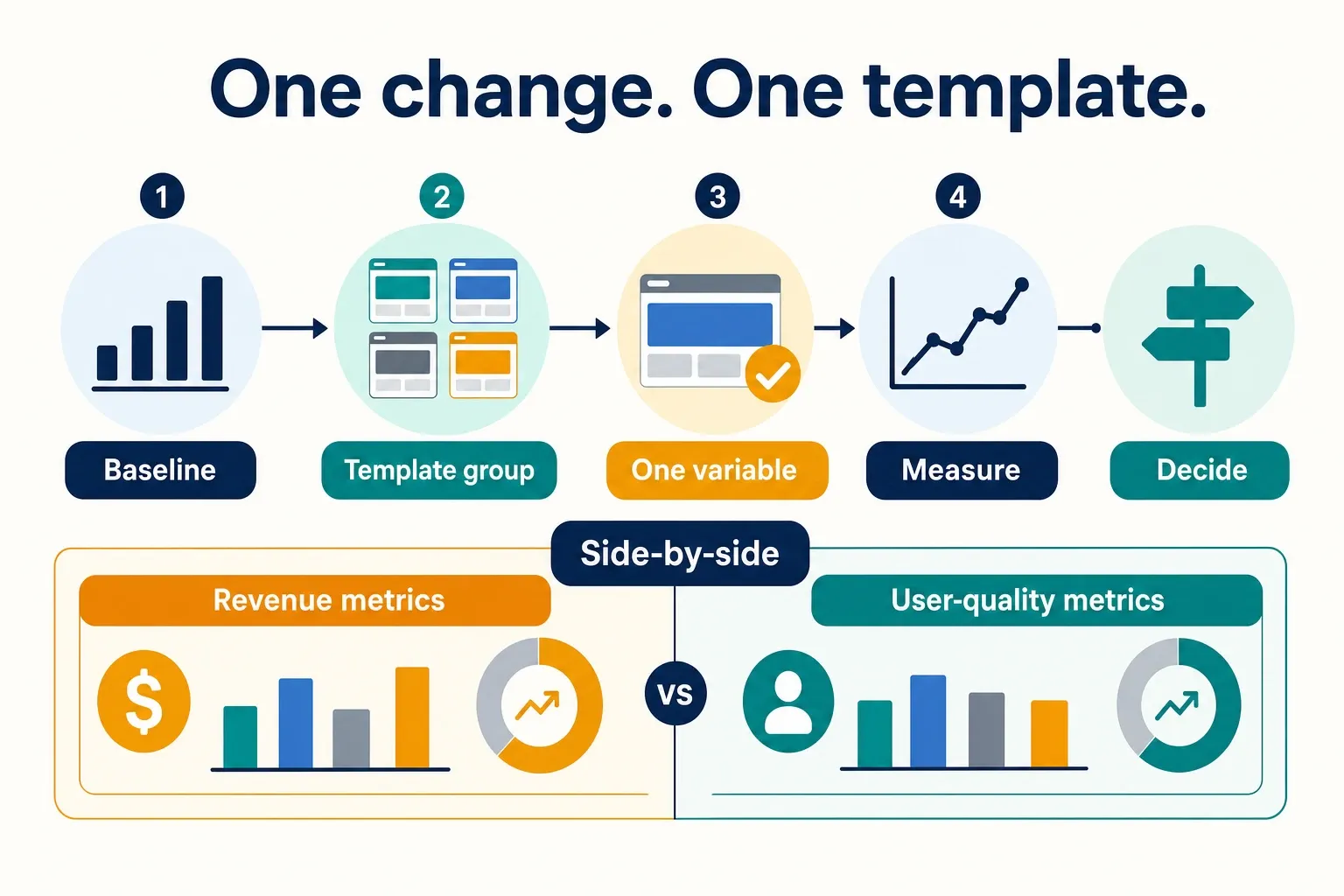
- Set the baseline by template, device type, and placement group. Pull Google Ad Manager reporting for impressions, revenue, CPM, Active View viewability, and fill; pair it with page analytics for scroll depth, time on page, exits, and sessions per user. Split mobile article, desktop article, gallery, homepage, category, and commerce pages instead of averaging them together.
- Change one variable at a time: slot count, slot size, or placement position. If you remove a rail unit, move an in-content unit, and turn on lazy loading in the same release, you will not know which change created the result. For header bidding stacks, keep bidder configuration stable during the test unless the density change requires a specific auction adjustment.
- Use viewability, revenue per session or pageview, and engagement as the decision set. Playwire argues that ad density success should be measured beyond revenue per pageview, which is the right operating posture for publishers that care about repeat visits and total yield, not only the current page Playwire.
- Define stop conditions before launch. Roll back if the test creates layout overlap, visible speed degradation, a clear viewability drop on premium placements, or a meaningful engagement decline on the tested template. Do not wait for a full revenue cycle if the first QA pass shows a broken viewport.
Which ad density changes are worth testing first
The best first density test has clear yield upside, low implementation risk, and an obvious template fit. Use this table to prioritize common publisher layouts, not as a guarantee that the same change will lift every site.
| Density change to test | Expected revenue impact | UX risk | Implementation effort | Best-fit page types | Don’t use this first when | Evidence anchor |
|---|---|---|---|---|---|---|
| Move a weak below-the-fold unit into a cleaner in-content position | Medium to high if the old unit had low viewability and the new break respects reading flow | Medium, because poor spacing can interrupt the article | Medium | Long-form articles, news analysis, evergreen guides | The article has very short paragraphs or high mobile bounce from early interruptions | Mile Tech recommends optimizing ad placement for viewability rather than raw density and moving underperforming below-the-fold units into in-content positions Mile Tech |
| Apply lazy loading to lower-page units | Medium, often through better load behavior and fewer wasteful early requests | Low to medium, depending on render timing | Medium | Infinite scroll, long articles, galleries, mixed article templates | Your current issue is above-the-fold clutter, because lazy loading lower slots will not fix the first screen | Mile Tech specifically calls out lazy loading so ads load only as needed Mile Tech |
| Reduce crowded above-the-fold ad exposure | Medium, with upside from stronger engagement and cleaner premium placements | Low, if content becomes easier to reach | Low to medium | Mobile news articles, homepages, category pages | The top unit is your only consistently viewable premium placement and the real problem sits lower on the page | Databeat’s visible-space framing supports evaluating how much of the user’s first screen is occupied by ads Databeat |
| Remove or suppress low-value repeated in-content units | Low to medium, unless the removed units were dragging session quality or viewability | Low | Low | Short news, slideshows with thin text, syndicated content | The units are high-viewability sponsorship inventory with direct-sold commitments | Playwire’s guidance to look beyond revenue per pageview supports checking engagement impact before adding or keeping repeated placements Playwire |
| Rationalize sticky elements across ads and non-ad modules | Medium if it protects viewability without blocking content | Medium to high, because sticky behavior is easy to overdo | Medium | Mobile article pages, video-heavy pages, commerce content | You have not mapped consent banners, app prompts, and video stickies on the same viewport | Google policy makes accidental-click and content-obstruction risk a compliance issue, not only a UX preference Google Publisher Policies |
| Standardize slot sizes against accepted display formats | Low to medium, mostly through cleaner layout and easier demand matching | Low | Medium | Mixed-template sites with legacy ad units | The revenue problem is auction pressure or floor strategy rather than layout inconsistency | IAB Tech Lab’s ad portfolio gives a practical reference point for display ad format planning IAB Tech Lab |
The table also explains why "remove ads" is often the wrong first move. If the weak spot is a below-the-fold slot loading too early, lazy loading may keep the demand opportunity while cutting waste. If the issue is first-screen clutter, a timing fix won't change what the user sees.
Tools and reporting to audit ad load site-wide
A useful ad-load audit pulls together Google Ad Manager reporting, page analytics, and ad stack diagnostics at the template level. Site averages are too blunt because the worst density problems usually sit in a small set of high-traffic layouts.
Build the audit around templates, not properties
Build the matrix around template type, device class, traffic source, and placement group. A mobile article from Google Discover, a desktop homepage visit, and a shopping guide from search can all belong to the same property, but they produce very different ad exposure patterns.
In Google Ad Manager, group placements in a way that reflects the page experience: top, first in-content, mid-content, rail, sticky, video, and below-the-fold ad units. Then compare revenue, fill, and viewability with analytics signals like scroll depth and exits. You are looking for dense templates that earn less efficiently than they seem to.
Use diagnostics to catch load behavior, not only layout
Lazy loading needs a timing review, not just an on/off label in the codebase. If a slot requests too early, it can slow the page without improving viewability. If it requests too late, the reader may pass it before the auction finishes.
Mile Tech's placement advice gets the operational priority right: optimize for viewability instead of piling on density Mile Tech. In practice, that means reviewing bidder timeouts, slot render events, refresh rules, and below-the-fold request timing together before you blame slot count.
Keep density from creeping back after the test
Density drift usually comes from small additions: a new affiliate widget, a sponsored module, a sticky video test, a consent message variant, then one more in-content unit. None of those tickets looks reckless on its own. Combined, they can turn a clean template into a crowded one within a quarter.
For commerce-heavy publishers, Voyado's framing is useful because it ties ad density to pricing, inventory controls, and shopper experience instead of treating ads as a separate layer Voyado. The same logic applies to editorial sites: density belongs in the yield stack review, not only in design QA.
End each rollout with a standing review, not a one-time chart. Assign an owner for template-level ad load, keep a changelog of releases that affect density, and review mobile screenshots with the same discipline you bring to GAM line item setup.
- Verify visible ad area on your top mobile and desktop templates, not just total slot count.
- Group GAM reporting by placement role: top, in-content, rail, sticky, video, and below-the-fold.
- Flag templates where revenue per pageview rises while viewability, scroll depth, or session quality weakens.
- Audit sticky elements together, including ads, video, consent, app prompts, and email capture modules.
- Test one density variable at a time: position, size, slot count, refresh behavior, or lazy loading timing.
- Set rollback conditions before launch, especially for overlap, slow rendering, and first-screen clutter.
- Prioritize fixes with a clear template fit instead of applying one ad-load rule across the whole property.
- Review density after major product, SEO, commerce, or sponsorship releases so the page does not drift back into overload.
Frequently asked questions
How do you calculate ad density on a page?
Measure the visible ad area against the visible page area after the page renders, not just the number of slots. A pixel-based audit is more useful because four large units can feel heavier than seven smaller ones, especially once sticky elements and lazy-loaded placements are on screen. On content-heavy templates, focus on the reading area users actually see.
Is there a fixed Google ad density limit?
No. There isn’t one universal number that fits every site, and the right threshold depends on template, device, and placement. A commonly cited 30% visible ad-space guideline is better used as a review trigger than a hard target, because a recipe page, a long article, and a landing page can tolerate very different loads. The practical limit is where the page starts to feel crowded, slow, or harder to use.
Should I reduce ad density or just move ads below the fold?
Often the better first move is placement, not removal. If an ad performs well in-content and stays viewable without interrupting the reading flow, you may not need fewer ads at all. The real test is whether moving the unit lowers clutter on the first screen while preserving viewability and revenue quality.
What metrics matter most in ad density optimization?
Use revenue per pageview or session, viewability, engagement, and load performance together. That mix tells you whether extra density is actually earning its keep, since higher ad load can increase impressions while still hurting scroll depth, rendering speed, or viewable quality. No single metric, including revenue alone, gives you the full picture.
How we researched this
Sources consulted for this article: